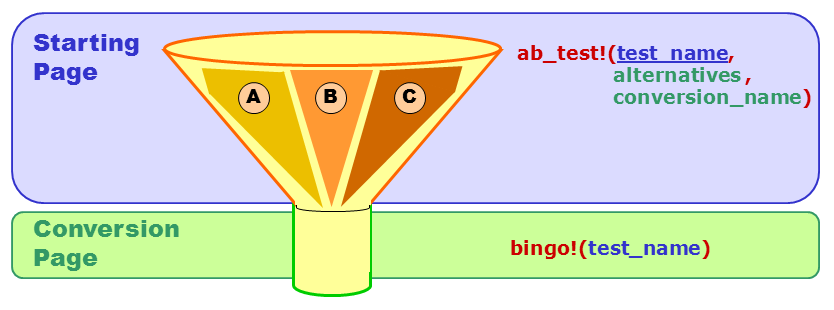
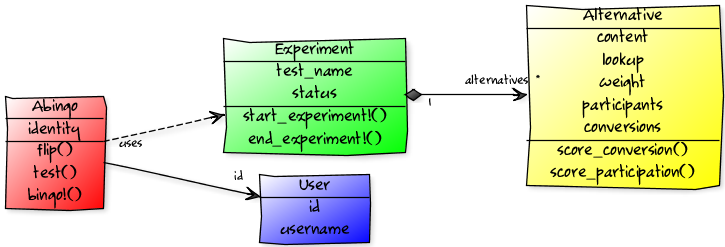
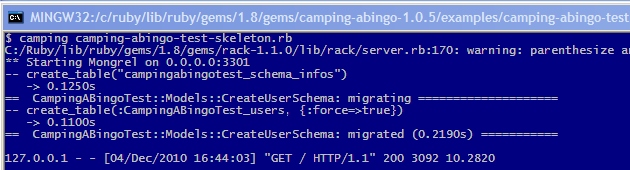
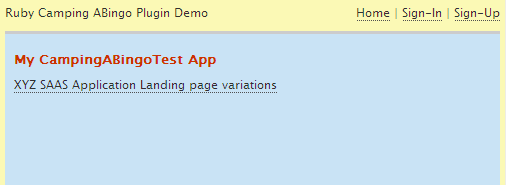
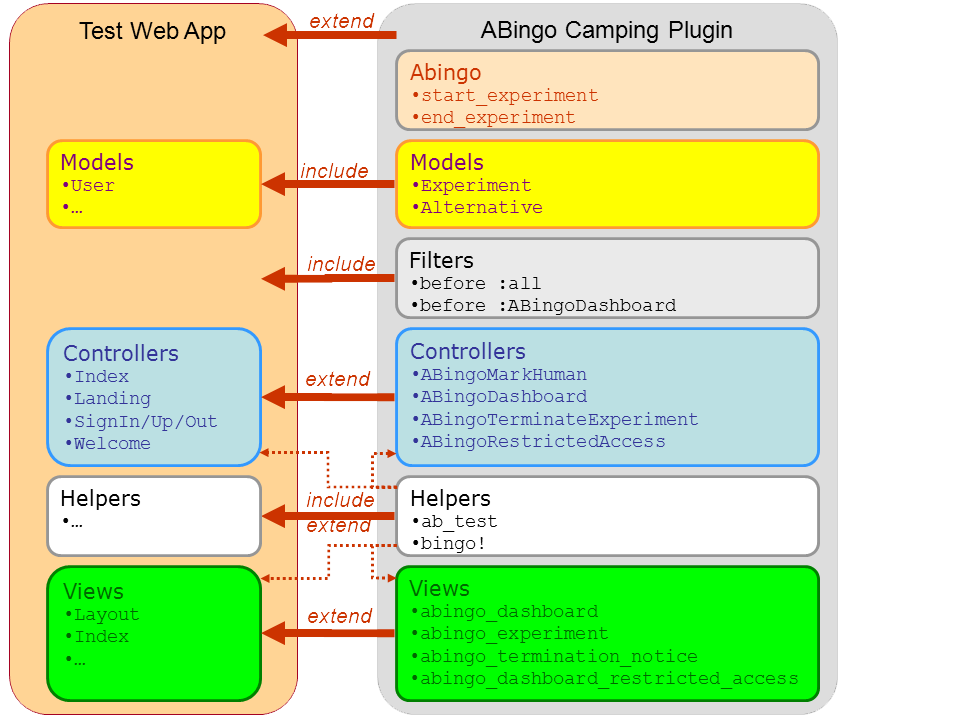
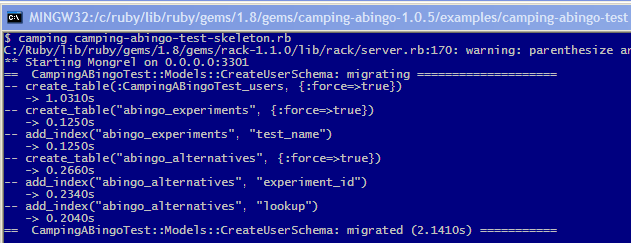
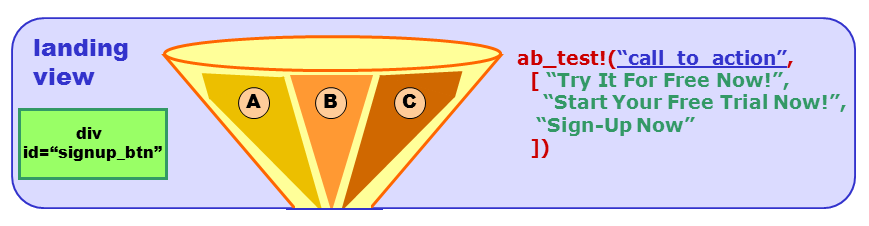
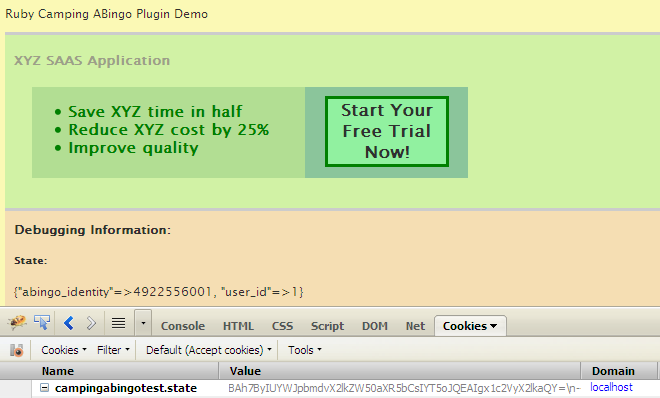
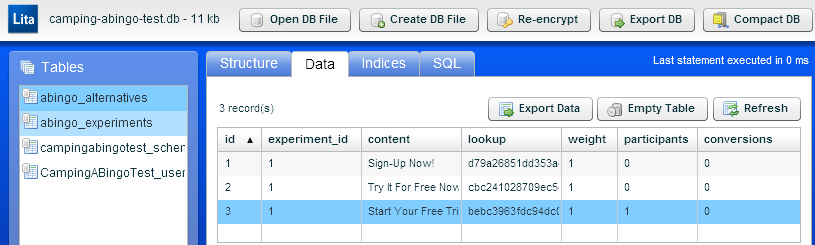
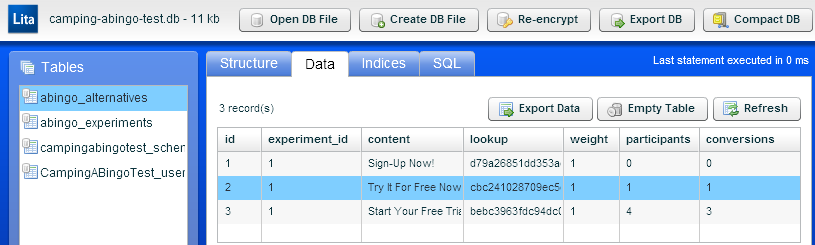
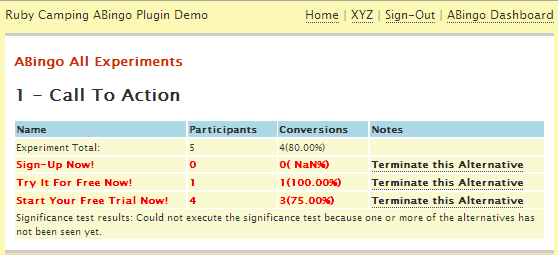
{"id":330,"date":"2010-12-14T00:00:16","date_gmt":"2010-12-14T07:00:16","guid":{"rendered":"http:\/\/blog.monnet-usa.com\/?p=330"},"modified":"2010-12-13T20:34:25","modified_gmt":"2010-12-14T03:34:25","slug":"ab-test-your-ruby-camping-web-app-using-abingo-part-2","status":"publish","type":"post","link":"https:\/\/blog.monnet-usa.com\/?p=330","title":{"rendered":"A\/B Test Your Ruby Camping Web App Using ABingo (Part 2)"},"content":{"rendered":"<br \/>\n<h3>Intro <\/h3>\n<p>In <a href=\"https:\/\/blog.monnet-usa.com\/?p=322\">&#8220;A\/B Test Your Ruby Camping Web App Using ABingo (Part 1)&#8221;<\/a>, I introduced  the <a href=\"#abpmk\">ABingo A\/B testing framework<\/a> and the new <a href=\"#tacaab\">Camping ABingo plugin<\/a>. In this article I will cover the following topics:\n\t\t\t\t\t<\/p>\n<ol>\n<li>Look under the ABingo Hood to understand its API, object model, and underlying database tables<\/li>\n<li>Create a draft of the ABingo Test Application<\/li>\n<li>Integrate ABingo into our test app<\/li>\n<li>Run and analyze experiments<\/li>\n<\/ol>\n<h3>Under The ABingo Hood<\/h3>\n<p>Before we can dive in the integration of the <a href='#tacaab'>Camping ABingo plugin<\/a> with our prototype application, here is a quick overview of the basics of the ABingo framework.<\/p>\n<h4>ABingo API<\/h4>\n<p>The two most important APIs are <a href=\"http:\/\/camping-abingo.monnet-usa.com\/classes\/ABingoCampingPlugin\/Helpers.html#M000050\">ab_test<\/a> and <a href=\"http:\/\/camping-abingo.monnet-usa.com\/classes\/Abingo.html#M000006\">bingo!<\/a>:<br \/>\n\t\t\t\t\t<img src='.\/wp-content\/media\/camping-abingo\/camping-abingo-api.png'  width=\"90%\" \/>\n\t\t\t\t\t<\/p>\n<table class='details_table'>\n<tr>\n<th>API<\/th>\n<th>Parameters<\/th>\n<th>Context<\/th>\n<th>Purpose\/Usage<\/th>\n<\/tr>\n<tr>\n<td><a name='api_ab_test'><br \/>\n\t\t<\/a>ab_test<\/td>\n<td>\n<ul class=\"api_parm\">\n<li>test name<\/li>\n<li><i>optional:<\/i> array of alternatives<\/li>\n<li><i>optional:<\/i> conversion name<\/li>\n<\/ul>\n<\/td>\n<td>View or Controller<\/td>\n<td>Select an alternative for the current user based on the alternatives specified for this test. If no alternatives are specified a boolean value is returned. Tracks the execution using the conversion name if provided otherwise use the test name.<\/td>\n<\/tr>\n<tr>\n<td><a name='api_bingo'><\/a>bingo!<\/td>\n<td>\n<ul  class=\"api_parm\">\n<li>conversion name (or test name)<\/li>\n<\/ul>\n<\/td>\n<td>Controller<\/td>\n<td>Tracks a conversion for the current user and the conversion specified. The test name is the fallback option.<\/td>\n<\/tr>\n<\/table>\n<p><\/p>\n<p>Note: these 2 main APIs are implemented in Camping in a helper module being included in both controllers and views. The <b>ab_test<\/b>  is <i>syntactic sugar<\/i> over the <b>test<\/b> method provided by the core <a href=\"http:\/\/camping-abingo.monnet-usa.com\/classes\/Abingo.html\" target=\u201d_blank\u201d>Abingo class<\/a>.<\/p>\n<h4  style=\"page-break-before:always;\">Model<\/h4>\n<p>The basic object model for the ABingo framework looks like this:<br \/>\n\t\t\t\t\t<img src='.\/wp-content\/media\/camping-abingo\/camping-abingo-uml.png' width='100%'\/>\n\t\t\t\t\t<\/p>\n<p><a name='abmo'><\/a><\/p>\n<table class='details_table'>\n<tr>\n<th>Model<\/th>\n<th>Responsibilities<\/th>\n<\/tr>\n<tr>\n<td><a name='abus'><\/a>User<\/td>\n<td>The user account on the prototype app<\/td>\n<\/tr>\n<tr>\n<td><a name='abapi'><\/a>Abingo<\/td>\n<td>ABingo&#8217;s main API class<\/td>\n<\/tr>\n<tr>\n<td><a name='abexp'><\/a>Experiment<\/td>\n<td>Represents a specific test based on multiple alternatives<\/td>\n<\/tr>\n<tr>\n<td><a name='abalt'><\/a>Alternative<\/td>\n<td>Tracks participants and conversions for a given alternative<\/td>\n<\/tr>\n<\/table>\n<p><\/p>\n<h4>ABingo Database Tables<\/h4>\n<p>ABingo will need to track executions of your <a href=\"#abexp\">Experiments<\/a> and their corresponding <a href=\"#abalt\">Alternatives<\/a> in the database associated with your application. So the ABingo Camping plugin will include the needed migration to add 2 tables to your schema. We&#8217;ll see this in more details later.<\/p>\n<h3>Create An ABingo Test Application<\/h3>\n<h4>Install Camping-ABingo<\/h4>\n<p>First let&#8217;s install the gem. (If you don&#8217;t have Camping or any of its dependent gem they will be installed)<\/p>\n<pre class=\"brush: ruby; gutter: false; toolbar: false;\">\r\ngem install camping-abingo\r\n<\/pre>\n<p>Note: You will find the fully functional test application under the <b>examples\/camping-abingo-test<\/b> folder in the camping-abingo gem folder. If you want to start using it right away, skip the next sections and go straight to <b><a href=\"#caabtest\">Setting Up Our First A\/B Test<\/a><\/b>. Otherwise follow along.<\/p>\n<h4>Running the Skeleton pre-ABingo Test Application<\/h4>\n<p>In the next sections I will show you how to integrate ABingo with the skeleton test app. But before let&#8217;s get the skeleton application up and running.<\/p>\n<ol class=\"blog-post-list\">\n<li>Locate the <b>examples\/camping-abingo-test<\/b> folder under your camping-abingo gem folder.<br \/>\n\t\t\t\t\t<img src='.\/wp-content\/media\/camping-abingo\/camping-abingo-cmd-1.png' ><br \/>\n\t\t\t\t\tThere are two versions of the test app: <\/p>\n<ul>\n<li>the skeleton (without ABingo support)<\/li>\n<li>the fully implemented version<\/li>\n<\/ul>\n<\/li>\n<li>Open <b>camping-abingo-test-skeleton.rb<\/b> in an editor. <\/li>\n<li>Then let&#8217;s start the <b>Camping<\/b> server with our skeleton:\n<pre class=\"brush: ruby; gutter: false; toolbar: false;\">\r\ncamping camping-abingo-test-skeleton.rb\r\n<\/pre>\n<\/li>\n<li>Open a browser and access the skeleton from the browser at the following url:\n<pre class=\"brush: ruby; gutter: false; toolbar: false;\">\r\nhttp:\/\/localhost:3001\/\r\n<\/pre>\n<p>\t\t\t\t\t\t<span  style=\"page-break-before:always;\">Camping will run the first migration to create the table for our User model:<\/span><\/p>\n<p>\t\t\t\t\t<img src='.\/wp-content\/media\/camping-abingo\/camping-abingo-cmd-migration1.png' width=\"610px\"><\/p>\n<p>\t\t\t\t\t\tAnd the basic test app should now come up:<\/p>\n<p>\t\t\t\t\t\t<img src='.\/wp-content\/media\/camping-abingo\/camping-abingo-tester.png' >\n\t\t\t\t\t\t<\/li>\n<li>You can now test the basic flow of the application. When viewing the landing page, the sign-up button should always be labeled &#8220;Sign-Up Now!&#8221;. Once ABingo is integrated we will be experimenting with different alternatives.<\/li>\n<\/ol>\n<p>\t\t\t\t\t<a name=\"addabprsu\" ><\/a><\/p>\n<h3>Adding ABingo Support To The Skeleton Test App<\/h3>\n<p>The ABingo plugin is composed of several modules mirroring the standard modules a typical Camping application would contain.<br \/>\n\t\t\t\t\tIntegrating the plugin will consist of linking the various modules using a combination of <b>include<\/b> and\/or <b>extend<\/b> statements where appropriate. Here is a high-level diagram of the integration approach:<\/p>\n<p>\t\t\t\t\t<img src='.\/wp-content\/media\/camping-abingo\/camping-abingo.png' width=\"600px\" style=\"margin-left: 40px\"><\/p>\n<p  style=\"page-break-before:always;\">Here are the steps we will be following:<\/p>\n<p><a name='caoatodo'><\/a><\/p>\n<table class='details_table'>\n<tr>\n<th>#<\/th>\n<th>To Do<\/th>\n<\/tr>\n<tr>\n<td><a href='#caabtodoa'>A<\/a><\/td>\n<td>Reference and require the needed gems<\/td>\n<\/tr>\n<tr>\n<td><a href='#caabtodob'>B<\/a><\/td>\n<td>Customize the main module<\/td>\n<\/tr>\n<tr>\n<td><a href='#caabtodod'>C<\/a><\/td>\n<td>Plugging in the ABingo common helpers module<\/td>\n<\/tr>\n<tr>\n<td><a href='#caabtodoc'>D<\/a><\/td>\n<td>Plugging in the ABingo Experience and Alternative models<\/td>\n<\/tr>\n<tr>\n<td><a href='#caabtodoe'>E<\/a><\/td>\n<td>Plugging in the ABingo Dashboard controllers<\/td>\n<\/tr>\n<tr>\n<td><a href='#caabtodof'>F<\/a><\/td>\n<td>Plugging in the ABingo Dashboard views<\/td>\n<\/tr>\n<tr>\n<td><a href='#caabtodog'>G<\/a><\/td>\n<td>Add code to manage the ABingo user identity in our controllers<\/td>\n<\/tr>\n<\/table>\n<p>\t<\/p>\n<p>\t\t\t\t\t<a name='caabtodoa'><\/a><\/p>\n<h5>A. Reference and require the needed gems<\/h5>\n<p>We will need to reference 2 gems: <b>filtering_camping<\/b> and <b>camping-abingo<\/b>. Also we will require the corresponding files we need: filtering_camping and camping-abingo.So now the top of the source should look like this:<\/p>\n<pre class=\"brush: ruby\">\r\ngem 'camping' , '>= 2.0'\t\r\ngem 'filtering_camping' , '>= 1.0'\t\r\ngem 'camping-abingo'\r\n\r\n%w(rubygems active_record erb  fileutils json markaby md5 redcloth  \r\ncamping camping\/session filtering_camping camping-abingo\r\n).each { |lib| require lib }\r\n\r\nCamping.goes :CampingABingoTest\r\n<\/pre>\n<p>\t\t\t\t\t<a name='caabtodob'><\/a><\/p>\n<h5>B.Customizing the main module<\/h5>\n<p>Ok, so now we&#8217;re ready to enhance the main app module. First we&#8217;ll make sure to include the Camping::Session and CampingFilters modules, and to extend the app module with ABingoCampingPlugin and its Filters submodule, like so:<\/p>\n<pre class=\"brush: ruby\">\r\nmodule CampingABingoTest\r\n\tinclude Camping::Session\r\n\tinclude CampingFilters\r\n\r\n\textend  ABingoCampingPlugin\r\n\tinclude ABingoCampingPlugin::Filters\r\n\t\r\n\t# ...\r\nend\r\n<\/pre>\n<p>We can also associate the logger with our <a href='#tacaab'>camping-abingo plugin<\/a>.<\/p>\n<pre class=\"brush: ruby\">\r\n\tCamping::Models::Base.logger = app_logger\r\n\tABingoCampingPlugin.logger   = app_logger\r\n<\/pre>\n<p>Now let&#8217;s customize the <b>create<\/b> method by adding a call to ABingoCampingPlugin.create, so we can get the plugin to run any needed initialization.<\/p>\n<pre class=\"brush: ruby\">\r\n\tdef CampingABingoTest.create\r\n\t\tABingoCampingPlugin.create\r\n\tend\r\n<\/pre>\n<p>We need to more things: let&#8217;s link our logger to the ABingo cache logger (to make it easier to debug issues), and let&#8217;s define which User id represent the administrator who will have access to the ABingo Dashboard. Now the final version of the create method looks like this:<\/p>\n<pre class=\"brush: ruby\">\r\n\tdef CampingABingoTest.create\r\n\t\tdbconfig = YAML.load(File.read('config\/database.yml'))\t\t\t\t\t\t\t\t\r\n\t\tenvironment = ENV['DATABASE_URL'] ? 'production' : 'development'\r\n\t\tCamping::Models::Base.establish_connection  dbconfig[environment]\r\n\r\n\t\tABingoCampingPlugin.create\r\n\t\tAbingo.cache.logger = Camping::Models::Base.logger\r\n\t\tAbingo.options[:abingo_administrator_user_id] = 1\r\n\r\n\t\tCampingABingoTest::Models.create_schema :assume => (CampingABingoTest::Models::User.table_exists? ? 1.1 : 0.0)\r\n\tend\r\n<\/pre>\n<p>Ok, at this point we have a minimally configured application module. <\/p>\n<p>\t\t\t\t\t<span  style=\"page-break-before:always;\"><\/span><br \/>\n\t\t\t\t\t<a name='caabtodod'><\/a><\/p>\n<h5>C.Plugging in the ABingo common helpers module<\/h5>\n<p>The Helpers module is used in <a href='#rc'>Camping<\/a> to provide common utilities to both the Controllers and Views modules. Enhancing our Helpers module is very easy, we need to add both an <b>extend<\/b> and an <b>include<\/b> of the ABingoCampingPlugin::Helpers module so we can enhance both instance and class sides:<\/p>\n<pre class=\"brush: ruby\">\r\nmodule CampingABingoTest::Helpers\r\n\textend ABingoCampingPlugin::Helpers\r\n\tinclude ABingoCampingPlugin::Helpers\r\nend<\/pre>\n<p>\t\t\t\t\t<a name='caabtodoc'><\/a><\/p>\n<h5>D.Plugging in the ABingo Experience and Alternative models<\/h5>\n<p>First, we&#8217;ll include the include ABingoCampingPlugin::Models module so we can get all the <a href='#abmo'>ABingo-specific models<\/a>. Our model will look like this:<\/p>\n<pre class=\"brush: ruby\">\r\nmodule CampingABingoTest::Models\r\n\tinclude ABingoCampingPlugin::Models\r\n\r\n\t# ...\r\nend\r\n<\/pre>\n<p>Now we&#8217;ll enhance the CreateUserSchema migration class to plug in our ABingo model migration.<\/p>\n<ul>\n<li>We&#8217;ll bump up the migration version number of the CreateUserSchema class to 1.1<\/li>\n<li>In the <b>up<\/b> method we will add a call to <b>ABingoCampingPlugin::Models.up<\/b> so that the <a href='#abexp'>Experience<\/a>, <a href='#abalt'>Alternative<\/a> tables can be created.<\/li>\n<li>In the <b>down<\/b> method we will add a call to <b>ABingoCampingPlugin::Models.down<\/b> to drop the ABingo tables.<\/li>\n<\/ul>\n<pre class=\"brush: ruby\">\r\n\tclass CreateUserSchema < V 1.1\r\n\t\tdef self.up\r\n\t\t\tcreate_table :CampingABingoTest_users, :force => true do |t|\r\n\t\t\t\t# ...\r\n\t\t\tend\r\n\t\t\t\r\n\t\t\t# ...\r\n\t\t\t\r\n\t\t\tABingoCampingPlugin::Models.up\r\n\t\tend\r\n\t\t\r\n\t\tdef self.down\t\t\r\n\t\t\tABingoCampingPlugin::Models.down\r\n\t\t\t\r\n\t\t\tdrop_table :CampingABingoTest_users\r\n\t\tend\r\n\tend\r\n<\/pre>\n<p>Now if we restart the application, our version 1.1 migration should be executed:<\/p>\n<p>\t\t\t\t\t<img src='.\/wp-content\/media\/camping-abingo\/camping-abingo-cmd-migration2.png' \/><\/p>\n<p>\t\t\t\t\t<span  style=\"page-break-before:always;\"><\/span><br \/>\n\t\t\t\t\t<a name='caabtodoe'><\/a><\/p>\n<h5>E.Plugging in the ABingo Dashboard controllers<\/h5>\n<p>We will need to extend our app <b>Controllers<\/b> module with the <b>ABingoCampingPlugin::Controllers<\/b> module using the <b>extend<\/b> statement. Then just before the end of the Controllers module, we&#8217;ll add a call to the <b>include_abingo_controllers<\/b> method. This is how <a href='#tacaab'>camping-abingo<\/a> will inject and plugin the ABingo Dashboard controllers and helpers. It is important that this call <u>always remaining the last statement of the module<\/u>, even when you add new controller classes. So the module should look like so:<\/p>\n<pre class=\"brush: ruby\">\r\nmodule CampingABingoTest::Controllers\r\n\textend ABingoCampingPlugin::Controllers\r\n\r\n\t# ...\r\n\r\n\tinclude_abingo_controllers\r\nend #Controllers\r\n<\/pre>\n<p>\t\t\t\t\t<a name='caabtodof'><\/a><\/p>\n<h5>F.Plugging in the ABingo Dashboard views<\/h5>\n<p>We will need to extend our app <b>Views<\/b> module with the <b>ABingoCampingPlugin::Views<\/b> module using the <b>extend<\/b> statement. Then just before the end of the Views module, we&#8217;ll add a call to the <b>include_abingo_views<\/b> method. This is how <a href='#tacaab'>camping-abingo<\/a> will inject and plugin the ABingo Dashboard views. It is important that this call <u>always remaining the last statement of the module<\/u>, even when you add new view methods. So the module should look like so:<\/p>\n<pre class=\"brush: ruby\">\r\nmodule CampingABingoTest::Views\r\n\textend ABingoCampingPlugin::Views\r\n\r\n\t# ...\r\n\t\r\n\tinclude_abingo_views\r\nend\r\n<\/pre>\n<p>\t\t\t\t\t<a name='caabtodog'><\/a><\/p>\n<h5>G.Add code to manage the ABingo user identity in our controllers<\/h5>\n<p>ABingo tracks the selected experiment alternatives and potential conversions for a <b>given user<\/b> using a property named <a href=\"http:\/\/camping-abingo.monnet-usa.com\/classes\/Abingo.html#M000003\">identity<\/a>. Currently the <b>ABingoCampingPlugin::Filters<\/b> we included in our main module provides a <b>filter<\/b> that executes <b>before all<\/b> controllers. That filter is responsible for ensuring the <b>Abingo.identity<\/b> is set using either a large random integer if the user is anonymous, or the actual id of an existing user. Here is what the filter looks like:<\/p>\n<pre class=\"brush: ruby\">\r\n\tbefore :all do\r\n\t\tset_abingo_identity\r\n\tend\r\n<\/pre>\n<p>To handle non-anonymous users and for our integration with our controllers to be complete we will need to:<\/p>\n<ol class=\"blog-post-list\">\n<li>Set the identity to the new user&#8217;s id once signup is complete.<br \/>\n\t\t\t\t\t\t\tSo in the <b>post<\/b> action of our <b>SignUp<\/b> controller, let&#8217;s set the <b>@state.abingo_identity<\/b> to our user&#8217;s id before rendering the Welcome view &#8211; see line 14:<\/p>\n<pre class=\"brush: ruby\">\r\n\tclass SignUp < R '\/signup'\r\n\t\t# get ...\r\n\t\t\r\n\t\tdef post\r\n\t\t\t@user = User.find_by_username(input.username)\r\n\t\t\tif @user\r\n\t\t\t\t@info = 'A user account already exist for this username.'\r\n\t\t\telse\r\n\t\t\t\t@user = User.new :username => input.username,\r\n\t\t\t\t\t:password => input.password\r\n\t\t\t\t@user.save\r\n\t\t\t\tif @user\r\n\t\t\t\t\t@state.user_id = @user.id\r\n\t\t\t\t\t@state.abingo_identity = @user.id\r\n\t\t\t\t\tredirect R(Welcome)\r\n\t\t\t\telse\r\n\t\t\t\t\t@info = @user.errors.full_messages unless @user.errors.empty?\r\n\t\t\t\tend\r\n\t\t\tend\r\n\t\t\trender :signup\r\n\t\tend\r\n\tend\r\n<\/pre>\n<\/li>\n<li>Replace the <b>abingo_identity<\/b> with the user&#8217;s id (<b>@user.id<\/b>) when someone signs-in. See line 9:\n<pre class=\"brush: ruby\">\r\n\tclass SignIn < R '\/signin'\r\n\t\t# ...\r\n\t\t\r\n\t\tdef post\r\n\t\t\t@user = User.find_by_username_and_password(input.username, input.password)\r\n\r\n\t\t\tif @user\r\n\t\t\t\t@state.user_id = @user.id\r\n\t\t\t\t@state.abingo_identity = @user.id\r\n\r\n\t\t\t\tif @state.return_to.nil?\r\n\t\t\t\t\tredirect R(Welcome)\r\n\t\t\t\telse\r\n\t\t\t\t\treturn_to = @state.return_to\r\n\t\t\t\t\t@state.return_to = nil\r\n\t\t\t\t\tredirect(return_to)\r\n\t\t\t\tend\r\n\t\t\telse\r\n\t\t\t\t@info = 'Wrong username or password.'\r\n\t\t\tend\r\n\t\t\t\r\n\t\t\trender :signin\t\t\r\n\t\tend\r\n\tend\r\n<\/pre>\n<\/li>\n<li>Generate a new random identity when the current user has signed-out.<br \/>\n\t\t\t\t\t\tSo let's set the <b>@state.abingo_identity<\/b> to another large random integer in the <b>get<\/b> action of our <b>SignOut<\/b> controller. See line 4:<\/p>\n<pre class=\"brush: ruby\">\r\n\tclass SignOut < R '\/signout'\t\t\r\n\t\tdef get\r\n\t\t\t@state.user_id = nil\r\n\t\t\t@state.abingo_identity = Abingo.identity = rand(10 ** 10).to_i\r\n\t\t\t\r\n\t\t\trender :index\r\n\t\tend\r\n\tend\r\n<\/pre>\n<\/li>\n<ol>\n<p>Now our integration steps are complete. We're now ready to do some A\/B testing!<\/p>\n<p>\t\t\t\t\t<a name='caabtest'><\/a><\/p>\n<h3>Setting Up Our First A\/B Test<\/h3>\n<h5>Selecting A Random Alternative For a Given Experience<\/h5>\n<p>For our first experiment named <b>call_to_action<\/b> we'll vary the text for our <b>signup_btn<\/b> button by selecting one of 3 alternatives based on the user.<br \/>\n\t\t\t\t\t<img src='.\/wp-content\/media\/camping-abingo\/camping-abingo-abtests-funnel-2.png'  width=\"90%\" \/><\/p>\n<p>\t\t\t\t\tSo let's modify the <b>landing<\/b> view of our test application. We'll change the assignment of the <b>signup_text<\/b> variable to the result of the <a href=\"http:\/\/camping-abingo.monnet-usa.com\/classes\/ABingoCampingPlugin\/Helpers.html#M000050\">ab_test<\/a> call. So our code will look like the following (with the ab_test call on line 9):<\/p>\n<pre class=\"brush: ruby\">\r\n\tdef landing\r\n\t\tdiv.xyz do\r\n\t\t\th1 'XYZ SAAS Application'\r\n\t\t\t\r\n\t\t\tdiv.marketing! do\r\n\t\t\t\t# benefits ...\r\n\t\t\t\t\r\n\t\t\t\tdiv.actnow! do\r\n\t\t\t\t\tsignup_text = ab_test(\"call_to_action\", \r\n\t\t\t\t\t\t\t\t\t\t\t[ \t\"Sign-Up Now!\",\r\n\t\t\t\t\t\t\t\t\t\t\t\t\"Try It For Free Now!\",\r\n\t\t\t\t\t\t\t\t\t\t\t\t\"Start Your Free Trial Now!\",\r\n\t\t\t\t\t\t\t\t\t\t\t])\r\n\t\t\t\t\t\r\n\t\t\t\t\ta :href=>\"\/signup\" do\r\n\t\t\t\t\t\tdiv.signup_btn!  signup_text\r\n\t\t\t\t\tend\r\n\t\t\t\tend\r\n\t\t\tend\r\n\t\tend\r\n\tend\r\n<\/pre>\n<h5>Recording A User Conversion<\/h5>\n<p>If we ran the application now ABingo would choose an alternative and keep track of it in terms of user <b>participation<\/b>.<br \/>\n\t\t\t\t\tSo now we just need to <b>record<\/b> an actual <b>conversion<\/b> for the <b>call_to_action<\/b> test when the user clicks on the <b>signup_btn<\/b> button.<br \/>\n\t\t\t\t\t<img src='.\/wp-content\/media\/camping-abingo\/camping-abingo-abtests-funnel-3.png'  width=\"90%\" \/>\t\t\t\t\t<\/p>\n<p>\t\t\t\t\tTo do that, we'll enhance the <b>get<\/b> action of our <b>SignUp<\/b> controller by calling the <a href=\"http:\/\/camping-abingo.monnet-usa.com\/classes\/Abingo.html#M000006\">bingo!<\/a> API with <b>call_to_action<\/b> as the name of the test. See line 3 below:<\/p>\n<p>At this stage, we have a basic Camping ABingo-enabled application, now let's test it!<\/p>\n<h3  style=\"page-break-before:always;\">Running Our First A\/B Test<\/h3>\n<p>So let's refresh the browser - if you stopped the Camping server then restart it (as a note Camping automatically reloads your changes). You have two in three chances to get a different alternatives than our original hard-coded text:<\/p>\n<p>\t\t\t\t\t<img src='.\/wp-content\/media\/camping-abingo\/camping-abingo-test5.png' width=\"575px\" ><\/p>\n<p>Let's look at the content of our <b>camping-abingo-test.db<\/b> SQLite database (preferably with <a href='#lita'>Lita<\/a>, an AIR-based SQLite administration tool):<\/p>\n<p>\t\t\t\t\t<img src='.\/wp-content\/media\/camping-abingo\/camping-abingo-test6.png' width=\"575px\" ><br \/>\n\t\t\t\t\tNote that the number of participants for the displayed alternative is 1.\n\t\t\t\t\t<\/p>\n<p>If you are using FireBug with FireCookie, delete the <b>campingabingotest.state<\/b> and refresh the page. You should notice that the <b>abingo_identity<\/b> should change as well as the button text. Repeat the process several times. And occasionally click on the button to cause a conversion to occur.<br \/>\n\t\t\t\t\tLet's refresh our table contents in Lita:<\/p>\n<p>\t\t\t\t\t<img src='.\/wp-content\/media\/camping-abingo\/camping-abingo-test7.png'  width=\"575px\" ><br \/>\t<br \/>\n\t\t\t\t\tNote that the number of participants and conversions have increased across alternatives.\n\t\t\t\t\t<\/p>\n<h3>Viewing A\/B Test Results With The ABingo Dashboard<\/h3>\n<p>Checking the database for our results is quite tedious (even with Lita!), luckily ABingo has a built-in <b>Dashboard<\/b>. Our Camping ABingo plugin has already defined a couple controllers and routes. We just need to expose the main <b>\/abingo\/dashboard<\/b> route.<\/p>\n<p>So let's go to the <b>layout<\/b> method of our ABingo Test app. Right below the link for <b>Sign-Out<\/b> let's add a code fragment to only show a link to <b><\/b> if the id of the current signed-in user is the id of the allowed ABingo Administrator (using the <b>abingo_administrator_user_id<\/b> ABingo helper method). See lines 7-10:<\/p>\n<pre class=\"brush: ruby\">\r\ndef layout\r\n\thtml do\r\n\t\t# ...\r\n\t\t\r\n\t\t\t\t\t\ta \"Sign-Out\",\t:href=>'\/signout'\r\n\t\t\t\t\t\t\r\n\t\t\t\t\t\tif @state.user_id == abingo_administrator_user_id\r\n\t\t\t\t\t\t\tspan \" | \"\r\n\t\t\t\t\t\t\ta \"ABingo Dashboard\", :href=>\"\/abingo\/dashboard\"\r\n\t\t\t\t\t\tend\r\n\t\t\t\t\t\t\r\n\t\t# ...\r\n\tend\r\nend\r\n<\/pre>\n<p>Now let's sign-in as the default administrator for our app. Use <b>admin<\/b> for the id and <b>camping<\/b> as the password. You should now see a <b>\"ABingo Dashboard\"<\/b> link in the top right of the navigation bar. Click on it. The dashboard should now show you the results:<\/p>\n<p>\t\t\t\t\t<img src='.\/wp-content\/media\/camping-abingo\/camping-abingo-dashboard-2.png'   >\t<\/p>\n<p>Now it is easy to see the results and even terminate a given alternative if we want to.<br \/>\n\t\t\t\t\tNote: each experiment you have defined will be listed with its corresponding details. <\/p>\n<h5>Choosing Your Caching Mechanism<\/h5>\n<p>By default the ABingo Plugin initialize its cache based on a <b>:memory_store<\/b>. This is fine and easy to troubleshoot our simple test app. But for your application you should consider a more advanced caching mechanisms - see the <a href=\"http:\/\/api.rubyonrails.org\/classes\/ActiveSupport\/Cache.html\">ActiveSupport Cache<\/a> documentation. One suggestion is to use Memcached if possible (e.g. on Heroku).<\/p>\n<h3>So What? <\/h3>\n<ol>\n<li>Patrick McKenzie's <a href='#abpmk'>ABingo<\/a> is a powerful A\/B testing framework for Ruby apps.<\/li>\n<li><a href='#abpmk'>ABingo<\/a> makes it easy to define and execute experiments with multiple alternatives.<\/li>\n<li>The ABingo Dashboard makes interpreting test results a breeze!<\/li>\n<\/ol>\n<p>So hopefully this second post on ABingo (see <a href=\"https:\/\/blog.monnet-usa.com\/?p=322\">here for the first post<\/a> of the serie) will have given you a feel for how easy it is to <b>A\/B test-enable<\/b> a Ruby <a href='#rc'>Camping<\/a>-based web application using the <a href='#tacaab'>Camping ABingo plugin<\/a>.<\/p>\n<p>\t\t\t\t\tHappy ABingo A\/B experiments!!!<\/p>\n<p>\t\t\t\t\t<i>Note: You can try the demo app yourself at: <a href='http:\/\/camping-abingo.heroku.com\/'>camping-abingo.heroku.com<\/a> (including the ABingo Dashboard if you sign in as admin \/ camping).<\/i><\/p>\n<p>\t\t\t\t\tIn a subsequent post I will cover some advanced topics (caching, troubleshooting, multi-variates, etc.) for Camping ABingo. Stay tuned!<\/p>\n<div  style=\"page-break-before:always;\"><\/div>\n<p>\t\t\t\t\t<a name=\"referencesandresources\" ><\/a><\/p>\n<h3>References and Resources<\/h3>\n<h5>A\/B Testing<\/h5>\n<ul>\n<li><a name='abwp' href='http:\/\/en.wikipedia.org\/wiki\/A\/B_Testing'>A\/B Testing Definition on Wikipedia<\/a><\/li>\n<li><a name='abbasics' href='http:\/\/elem.com\/~btilly\/effective-ab-testing\/'>Effective A\/B Testing Basics (by Ben Tilly)<\/a><\/li>\n<li><a name='abgg' href='https:\/\/www.google.com\/analytics\/siteopt\/siteopt\/help\/overvw.html'>Google Website Optmizer<\/a><\/li>\n<li><a name='abpmk' href='http:\/\/www.bingocardcreator.com\/abingo'>ABingo A\/B Testing Framework (by Patrick McKenzie)<\/a><\/li>\n<li><a name='pmk' href='http:\/\/www.kalzumeus.com\/'>Patrick McKenzie's Blog<\/a><\/li>\n<li><a name='abpmktz' href='http:\/\/techzinglive.com\/page\/479\/79-tz-interview-%e2%80%93-patrick-mckenzie-optimize-this'>Patrick McKenzie Interview On TechZing Podcast<\/a><\/li>\n<\/ul>\n<h5>Camping<\/h5>\n<ul>\n<li><a name='rc' href='http:\/\/github.com\/camping\/camping'>Ruby Camping Framework<\/a><\/li>\n<li><a name='tacaab' href='http:\/\/github.com\/techarch\/camping-abingo'>Camping-ABingo repository on GitHub<\/a><\/li>\n<li><a name='tacaabdo' href='http:\/\/camping-abingo.heroku.com\/'>Camping-ABingo Demo On Heroku<\/a><\/li>\n<\/ul>\n<h5>Miscellaneous<\/h5>\n<ul>\n<li><a name='tz' \thref='http:\/\/techzinglive.com'>TechZing Podcast for web startup entrepreneurs<\/a><\/li>\n<li><a name='lita' href='http:\/\/www.dehats.com\/drupal\/?q=node\/58'>Lita, a SQLite administration tool<\/a><\/li>\n<\/ul>\n<h5>My Other Related Posts:<\/h5>\n<ul name=\"myotherrelatedposts\">\n<li><a href='https:\/\/blog.monnet-usa.com\/?p=322'>A\/B Test Your Ruby Camping Web App Using ABingo (Part 1)<\/a><\/li>\n<li><a href='https:\/\/blog.monnet-usa.com\/?p=223'>Visualize Application Metrics on NewRelic for your Ruby Camping Application<\/a><\/li>\n<\/ul>\n<p>\t\t\t\t\t<a name='abcasrc'><\/a><\/p>\n<h5>Source Code<\/h5>\n<div   class='download_panel'>All source is available on GitHub:<\/p>\n<ul>\n\t\t\t\t\t\t<a href='http:\/\/bit.ly\/camping-abingo'>Camping ABingo <b>Plugin<\/b> library<\/a><br \/>\n\t\t\t\t\t\t<a href='http:\/\/bit.ly\/cgabtst'>Camping ABingo <b>Test<\/b> Example<\/a>\n\t\t\t\t\t<\/div>\n<div class=\"blog-msm-ad\">\n<div class=\"blog-msm-ad1\">\n\t\t\t\t\t\t\tIf you enjoyed this post, I would love it if you could check out <a href=\"http:\/\/bit.ly\/myskillsmap\">mySkillsMap<\/a>, my skills management app.\n\t\t\t\t\t\t<\/div>\n<div class=\"blog-msm-ad2\">\n\t\t\t\t\t\t\t\t<a href=\"http:\/\/www.myskillsmap.com\/signup?opt=trial&#038;origin=tabg\"><br \/>\n\t\t\t\t\t\t\t\t\t<img src='.\/wp-content\/media\/msm\/start-your-free-trial-now.png'  \/><br \/>\n\t\t\t\t\t\t\t\t<\/a>\n\t\t\t\t\t\t<\/div>\n<\/p><\/div>\n","protected":false},"excerpt":{"rendered":"<p>Intro In &#8220;A\/B Test Your Ruby Camping Web App Using ABingo (Part 1)&#8221;, I introduced the ABingo A\/B testing framework and the new Camping ABingo plugin. In this article I will cover the following topics: Look under the ABingo Hood to understand its API, object model, and underlying database tables Create a draft of the [&hellip;]<\/p>\n","protected":false},"author":1,"featured_media":0,"comment_status":"open","ping_status":"closed","sticky":false,"template":"","format":"standard","meta":{"footnotes":""},"categories":[1],"tags":[],"class_list":["post-330","post","type-post","status-publish","format-standard","hentry","category-uncategorized"],"_links":{"self":[{"href":"https:\/\/blog.monnet-usa.com\/index.php?rest_route=\/wp\/v2\/posts\/330","targetHints":{"allow":["GET"]}}],"collection":[{"href":"https:\/\/blog.monnet-usa.com\/index.php?rest_route=\/wp\/v2\/posts"}],"about":[{"href":"https:\/\/blog.monnet-usa.com\/index.php?rest_route=\/wp\/v2\/types\/post"}],"author":[{"embeddable":true,"href":"https:\/\/blog.monnet-usa.com\/index.php?rest_route=\/wp\/v2\/users\/1"}],"replies":[{"embeddable":true,"href":"https:\/\/blog.monnet-usa.com\/index.php?rest_route=%2Fwp%2Fv2%2Fcomments&post=330"}],"version-history":[{"count":5,"href":"https:\/\/blog.monnet-usa.com\/index.php?rest_route=\/wp\/v2\/posts\/330\/revisions"}],"predecessor-version":[{"id":335,"href":"https:\/\/blog.monnet-usa.com\/index.php?rest_route=\/wp\/v2\/posts\/330\/revisions\/335"}],"wp:attachment":[{"href":"https:\/\/blog.monnet-usa.com\/index.php?rest_route=%2Fwp%2Fv2%2Fmedia&parent=330"}],"wp:term":[{"taxonomy":"category","embeddable":true,"href":"https:\/\/blog.monnet-usa.com\/index.php?rest_route=%2Fwp%2Fv2%2Fcategories&post=330"},{"taxonomy":"post_tag","embeddable":true,"href":"https:\/\/blog.monnet-usa.com\/index.php?rest_route=%2Fwp%2Fv2%2Ftags&post=330"}],"curies":[{"name":"wp","href":"https:\/\/api.w.org\/{rel}","templated":true}]}}