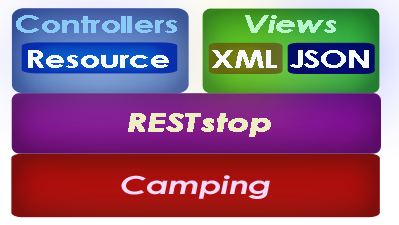
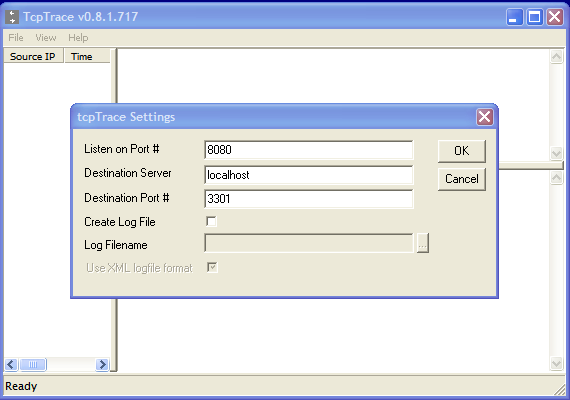
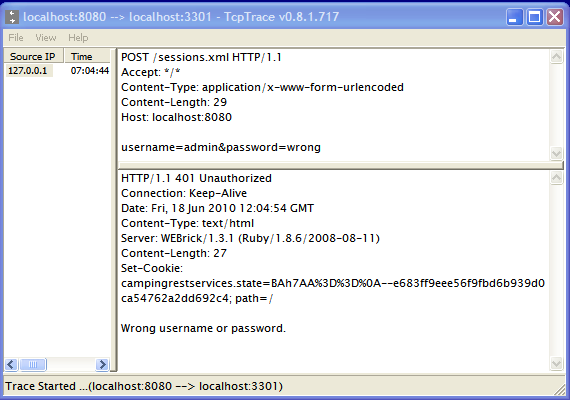
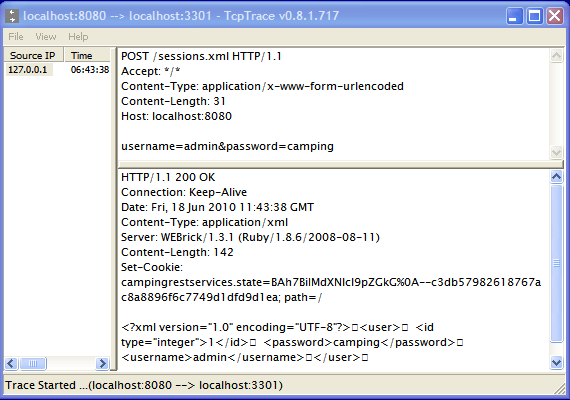
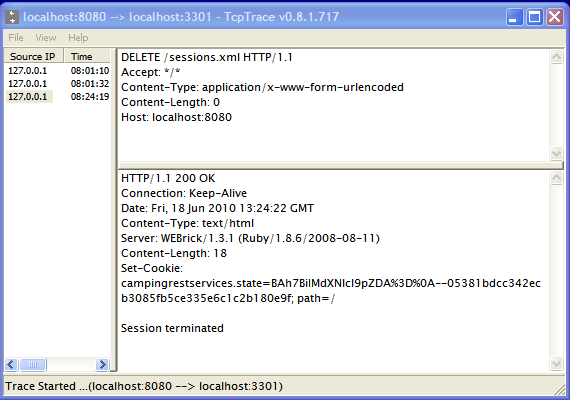
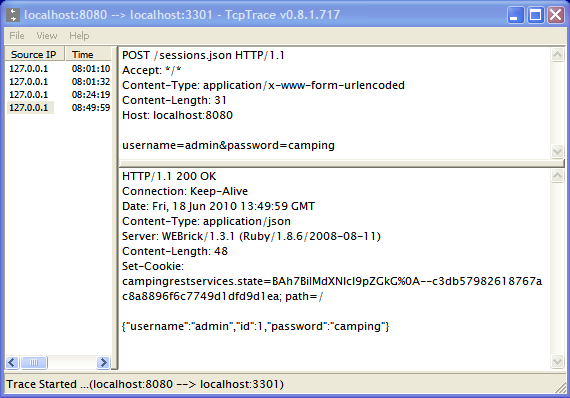
{"id":298,"date":"2010-06-22T21:50:47","date_gmt":"2010-06-23T04:50:47","guid":{"rendered":"http:\/\/blog.monnet-usa.com\/?p=298"},"modified":"2010-06-22T21:50:47","modified_gmt":"2010-06-23T04:50:47","slug":"implementing-ruby-camping-rest-services-with-reststop","status":"publish","type":"post","link":"https:\/\/blog.monnet-usa.com\/?p=298","title":{"rendered":"Implementing Ruby Camping REST Services With RESTstop"},"content":{"rendered":"<br \/>\n<h3>Intro <\/h3>\n<p>It is pretty common nowadays for web applications and sites to expose a developer API to allow consumers to integrate their data with other application. Examples: Twitter, LinkedIn, Bit.ly, etc. <\/p>\n<p>Although there are various options for implementing web services, as of 2010, the <a href='#rest'>REST<\/a> protocol seems to have achieved a <b>comfortable lead<\/b> over other approaches for <b>Internet<\/b>-based <b>resource-oriented<\/b> services.<\/p>\n<p><a href='#rs'>RESTstop<\/a> is a Ruby library making it easy to implement <a href='#rest'>REST<\/a> services<br \/>\n\t\t\t\t\ton top of the <a href='#rc'>Camping framework<\/a>.<\/p>\n<p>\t\t\t\t\t<img src='.\/wp-content\/media\/camping-reststop\/reststop.png' style='margin-left:60px;'><\/p>\n<h3>Web Services Implementation Options<\/h3>\n<p>Before jumping to <a href='#rs'>RESTstop<\/a> (if you insist click <a href='#reststop-plugin'>here<\/a>), let&#8217;s do a brief review of the few options,<br \/>\n\t\t\t\t\tdevelopers have historically leveraged to build web services:<\/p>\n<ol>\n<li><a href='#soap-svcs'>SOAP services<\/a>:  the API is <b>formally defined<\/b> using the WSDL format. API messages use a specific XML representation.<br \/>\n\t\t\t\t\t\tAdditional services can be composed on top of the basic protocol to provide authentication, authorization, etc.<br \/>\n\t\t\t\t\t\tAlthough powerful, SOAP has proven <b>too complex<\/b> and <b>too heavy<\/b> for web developer APIs .<br \/>\n\t\t\t\t\t\tAlso they require a full <b>SOAP-compatible client stack<\/b> for making them more difficult to call especially in the case of AJAX applications.<br \/>\n\t\t\t\t\t\tAs a consequence, SOAP services tend to have been relegated to <b>intra-enterprise cross-application services<\/b>. <\/li>\n<p><\/p>\n<li><a href='#xml-svcs'>XML services<\/a>: the API is <b>not formally defined<\/b> but end-points and their inputs and outputs are usually documented on a developer site.<br \/>\n\t\t\t\t\t\tEach service has a given url and uses XML to represent messages. As such an <b>XML parser<\/b> is required to provide robust processing<br \/>\n\t\t\t\t\t\tespecially if the data structures are complex and rely on namespaces.<\/li>\n<p><\/p>\n<li><a href='#json-svcs'>JSON services<\/a>: similarly to the XML services the API is also <b>not formally defined<\/b>.<br \/>\n\t\t\t\t\t\tMessages are represented as <a href='#json'>JSON<\/a> structures.<br \/>\n\t\t\t\t\t\t<a href='#json'>JSON<\/a> services lend themselves very well to <b>AJAX<\/b> calls from browser applications since<br \/>\n\t\t\t\t\t\t<a href='#json'>JSON<\/a> structures can be easily processed using basic Javascript.<\/li>\n<p><\/p>\n<li>APIs for web sites mostly need to expose &#8220;<a href='#resource'>resources<\/a>&#8221; as opposed to behaviors (e.g. : CRUD operations on Posts) <\/li>\n<\/ol>\n<h3>Camping for Web Services<\/h3>\n<p>Since <a href='#rc'>Camping<\/a> is a generic Ruby web application framework, you can define service <a href='#routes'>endpoints as url routes<\/a>,<br \/>\n\t\t\t\t\teach mapped to a given <b>controller<\/b>.<br \/>\n\t\t\t\t\tAn HTML-based view is not necessary obviously, so instead one option is to render the model<br \/>\n\t\t\t\t\tusing the desired format: <b>XML<\/b> or <a href='#json'>JSON<\/a>.<br \/>\n\t\t\t\t\tExample:\n\t\t\t\t\t<\/p>\n<pre class=\"brush: ruby\">\r\ngem 'camping' , '>= 2.0'\t\r\n%w(rubygems active_support active_support\/json active_record camping camping\/session markaby erb ).each { | lib | require lib }\r\n\r\nCamping.goes :CampingJsonServices\r\n\r\nmodule CampingJsonServices\r\n\tinclude Camping::Session\r\n\r\n\tdef CampingJsonServices.create\r\n\tend\r\n\r\n\tmodule CampingJsonServices::Controllers\r\n\r\n\t\tclass APIDateToday < R '\/datetoday'\r\n\t\t\tdef get\r\n\t\t\t\t@result = {:today=>Date.today.to_s}\r\n\t\t\t\t\r\n\t\t\t\t@headers['Content-Type'] = \"application\/json\"\r\n\t\t\t\t@result.to_xml(:root=>'response')\r\n\t\t\tend\r\n\t\tend\r\n\r\n\t\tclass APITimeNow < R '\/timenow'\r\n\t\t\tdef get\r\n\t\t\t\t@result = {:now=>Time.now.utc.to_s}\r\n\t\t\t\t\r\n\t\t\t\t@headers['Content-Type'] = \"application\/json\"\r\n\t\t\t\t@result.to_json\r\n\t\t\tend\r\n\t\tend\r\n\r\n\tend\r\nend\t\r\n<\/pre>\n<p>Such as an approach is fine for <i>function-oriented APIs<\/i> but if we want to provide CRUD access to <a href='#resource'>resources<\/a>,<br \/>\n\t\t\t\t\tthen a <a href='#rest'>REST<\/a> approach provides more structure. You can of course implement a <a href='#rest'>REST<\/a>-style API on your own<br \/>\n\t\t\t\t\tby overriding the route dispatch mechanism and mapping the HTTP verbs such as PUT and DELETE<br \/>\n\t\t\t\t\tto the appropriate route controller methods.\n\t\t\t\t\t<\/p>\n<p>\t\t\t\t\t<a name='reststop-plugin'><\/a>\t<\/p>\n<h3>RESTstop, a REST plugin for Camping<\/h3>\n<p><a href='#mz'>Matt Zukowski<\/a> wrote the <a href='#rs'>RESTstop<\/a> library to easily provide access to <a href='#resource'>REST resources<\/a> using the underlying Camping route engine and controllers.<br \/>\n\t\t\t\t\tThe idea was powerful yet simple, as a developer you would create a controller per <a href='#resource'>resource<\/a><br \/>\n\t\t\t\t\tand specify the <a href='#rest'>REST<\/a> nature of the route like so:<\/p>\n<pre class=\"brush: ruby\">\r\nmodule Blog::Controllers\r\n  extend Reststop::Controllers\r\n\r\n\tclass Posts < REST 'posts'      \r\n\tend\r\nend\r\n<\/pre>\n<p>Then similarly to the standard <b>get<\/b> and <b>post<\/b> methods of Camping controllers, you would create <b>CRUD-style<\/b> action methods<br \/>\n\t\t\t\t\tsuch as: <b>create<\/b>, <b>read<\/b>, <b>update<\/b>, <b>delete<\/b>, and <b>list<\/b>:<\/p>\n<pre class=\"brush: ruby\">\r\nclass Posts < REST 'posts'      \r\n      # POST \/posts\r\n      def create \r\n      end\r\n\r\n      # GET \/posts\/1\r\n      # GET \/posts\/1.xml\r\n      def read(post_id)\r\n      end\r\n\r\n      # PUT \/posts\/1\r\n      def update(post_id)\r\n      end\r\n\r\n      # DELETE \/posts\/1\r\n      def delete(post_id)\r\n      end\r\n\r\n      # GET \/posts\r\n      # GET \/posts.xml\r\n      def list\r\n\tend\r\nend\r\n<\/pre>\n<p>Then once you had a controller, you would implement a <b>special type of view<\/b> appropriate for the format of the data you wanted to expose.<br \/>\n\t\t\t\t\tFor example you could create views to render the data as XML or <a href='#json'>JSON<\/a> or any other format you liked.<\/p>\n<pre class=\"brush: ruby\">\r\nmodule Blog::Views\r\n  extend Reststop::Views\r\n  \r\n  module HTML\r\n    include Blog::Controllers\r\n    include Blog::Views\r\n\t\r\n    def index\r\n      if @posts.empty?\r\n        p 'No posts found.'\r\n      else\r\n        for post in @posts\r\n          _post(post)\r\n        end\r\n      end\r\n      p { a 'Add', :href => R(Posts, 'new') }\r\n    end\r\n\t\r\n  end\r\n  \r\n  module XML\r\n    include Blog::Controllers\r\n    include Blog::Views\r\n\t\r\n    def index\r\n      @posts.to_xml(:root => 'blog')\r\n    end\r\n\t\r\n  end\r\n  \r\n  module JSON\r\n    include Blog::Controllers\r\n    include Blog::Views\r\n\t\r\n    def index\r\n      @posts.to_json\r\n    end\r\n  end\r\n\t\r\n<\/pre>\n<h3>The Inner Plumbing Of RESTstop<\/h3>\n<p><a href='#rs'>RESTstop<\/a> is an interesting plugin to dissect as it is a good illustration of <a href='#metaprog'>meta-programming<\/a> in Ruby.<br \/>\n\t\t\t\t\t<a href='#mz'>Matt<\/a> took the following approach:<\/p>\n<ol>\n<li>Alias and override the base <b>service<\/b> method to save off the HTTP verb<\/li>\n<li>Add a new route creation method called <b>REST<\/b> to replace the base <b>r<\/b> route creation method.<br \/>\n\t\t\t\t\t\t\tThe new method will register all the expected REST resource routes and wire them up to the controller.<\/li>\n<li>Default or decode the rendering format specified in the url (e.g. \/posts.xml vs. \/posts.json)<\/li>\n<li>Structure the Views module according to the various formats to specify: HTML vs. XML vs. JSON<\/li>\n<li>Render the controller output using the specified format<\/li>\n<\/ol>\n<p>I would definitely recommend that your read the plugin's source. At 449 lines with many comments<br \/>\n\t\t\t\t\tit is pretty easy to see how it actually works. This will also make it easier for you to troubleshoot your code when needed.<\/p>\n<h3>Let's Create The REST Version Of The Blog Sample<\/h3>\n<p>Here is an outline of the approach:<\/p>\n<table class='details_table'>\n<tr>\n<th>#<\/th>\n<th>To Do<\/th>\n<th>Area (Module)<\/th>\n<\/tr>\n<tr>\n<td><a href='#todo1'>1<\/a><\/td>\n<td>Plug in RESTstop into the app<\/td>\n<td>Main app<\/td>\n<\/tr>\n<tr>\n<td><a href='#todo2'>2<\/a><\/td>\n<td>Plug in RESTstop into the Base<\/td>\n<td>Base<\/td>\n<\/tr>\n<tr>\n<td><a href='#todo3'>3<\/a><\/td>\n<td>Plug in RESTstop into the Controllers<\/td>\n<td>Controllers<\/td>\n<\/tr>\n<tr>\n<td><a href='#todo4'>4<\/a><\/td>\n<td>Create the REST <b>Sessions<\/b> controller<\/td>\n<td>Controllers<\/td>\n<\/tr>\n<tr>\n<td><a href='#todo5'>5<\/a><\/td>\n<td>Plug in RESTstop into the Helpers<\/td>\n<td>Helpers<\/td>\n<\/tr>\n<tr>\n<td><a href='#todo6'>6<\/a><\/td>\n<td>Plug in RESTstop into the Views<\/td>\n<td>Views<\/td>\n<\/tr>\n<tr>\n<td><a href='#todo7'>7<\/a><\/td>\n<td>Finish the REST <b>Sessions<\/b> controller<\/td>\n<td>Controllers<\/td>\n<\/tr>\n<tr>\n<td><a href='#todo8'>8<\/a><\/td>\n<td>Add <b>JSON<\/b> support<\/td>\n<td>Views<\/td>\n<\/tr>\n<tr>\n<td><a href='#todo9'>9<\/a><\/td>\n<td>Create the REST <b>Posts<\/b> controller<\/td>\n<td>Controllers<\/td>\n<\/tr>\n<tr>\n<td><a href='#todo10'>10<\/a><\/td>\n<td>Add an HTML view module for Posts<\/td>\n<td>Views<\/td>\n<\/tr>\n<tr>\n<td><a href='#todo11'>11<\/a><\/td>\n<td>Add an XML view module for Posts<\/td>\n<td>Views<\/td>\n<\/tr>\n<tr>\n<td><a href='#todo12'>12<\/a><\/td>\n<td>Add a JSON view module for Posts<\/td>\n<td>Views<\/td>\n<\/tr>\n<\/table>\n<p><\/p>\n<p>\t\t\t\t\t<a name='todo1'><\/a><\/p>\n<h5>1. Plug In RESTstop<\/h5>\n<p>Our first step is to install the gem and add a require for RESTstop:<\/p>\n<pre class=\"brush: ruby\">\r\ngem install reststop\r\n<\/pre>\n<p>Now let's create a new Ruby source file and name it <b>camping-svcs.rb<\/b>.<br \/>\n\t\t\t\t\tThen let's require RESTstop and include its main module in the blog's main module.<\/p>\n<pre class=\"brush: ruby\">\r\nrequire 'reststop'\r\n\r\nCamping.goes :Blog\r\n\r\nmodule Blog\r\n  include Camping::Session\r\n  include Reststop\r\nend\r\n<\/pre>\n<p>\t\t\t\t\t<a name='todo2'><\/a><\/p>\n<h5>2.Plug in RESTstop into the Base<\/h5>\n<p>Now we need to enhance the Base module, so let's specify it.<br \/>\n\t\t\t\t\tThis is the place where we'll add most of the extensions code taking care of:<\/p>\n<ul>\n<li>Aliasing 3 methods: render, lookup, and service so RESTstop can \"insert\" its magic<\/li>\n<li>Including Reststop::Base in the Base<\/li>\n<li>Adapt the Camping lookup method to look for view methods inside the RESTstop-specific Views::HTML module<\/li>\n<\/ul>\n<p>So add the following code:<\/p>\n<pre class=\"brush: ruby\">\r\nmodule Blog::Base\r\n  alias camping_render render\r\n  alias camping_lookup lookup\t# @techarch: required if camping > 2.0\r\n  alias camping_service service\r\n  include Reststop::Base\r\n  alias service reststop_service\r\n  alias render reststop_render\r\n  \r\n\t# Overrides the new Tilt-centric lookup method In camping\r\n\t# RESTstop needs to have a first try at looking up the view\r\n\t# located in the Views::HTML module. \r\n    def lookup(n)\r\n      T.fetch(n.to_sym) do |k|\r\n        t = Blog::Views::HTML.method_defined?(k) || camping_lookup(n)\r\n      end\r\n    end\r\nend\r\n<\/pre>\n<p>\t\t\t\t\t<a name='todo3'><\/a><\/p>\n<h5>3. Plug in RESTstop into the Controllers<\/h5>\n<p>Here we'll add an extend for the Reststop::Controllers.<\/p>\n<pre class=\"brush: ruby\">\r\nmodule Blog::Controllers\r\n  extend Reststop::Controllers\r\nend\r\n<\/pre>\n<p>This will add 2 new methods<\/p>\n<ul>\n<li><b>determine_format<\/b> : will extract the service data format from the request url - e.g json from \/posts.json<\/li>\n<li><b>REST<\/b> : will allow definition of REST resources in our controller declarations - e.g. class Posts < REST 'posts'<\/li>\n<\/ul>\n<p>\t\t\t\t\t<a name='todo4'><\/a><\/p>\n<h5>4. Create the REST Sessions controller<\/h5>\n<p>The <a href='#rcb'>Camping Blog example<\/a> has a simple <b>login system<\/b> built on top of the Camping session.<br \/>\n\t\t\t\t\tFor our REST blog, we'll want to support both an interactive web app login (like in the original blog)<br \/>\n\t\t\t\t\tas well as a service-based login so that only authenticated applications can call our services.<\/p>\n<p>So we'll expose a new REST resource called <b>Session<\/b>. Applications will be able to <b>create<\/b> and <b>delete<\/b> sessions -<br \/>\n\t\t\t\t\tto mirror the login and logout behavior. So let's create our first REST controller and name it <b>Sessions<\/b>:<\/p>\n<pre class=\"brush: ruby\">\r\n    class Sessions < REST 'sessions'\r\n\tend\r\n<\/pre>\n<p>Now we just need to declare only a subset of the standard <b>CRUD<\/b> REST methods: <b>create<\/b>, and <b>delete<\/b>.<br \/>\n\t\t\t\t\tFor now, let's just create the shell:<\/p>\n<pre class=\"brush: ruby\">\r\n        # POST \/sessions\r\n        def create\r\n        end   \r\n\r\n        # DELETE \/sessions\r\n        def delete\r\n        end\r\n<\/pre>\n<p>For the <b>create<\/b> method, we will lookup the user based on the user id and password.<br \/>\n\t\t\t\t\tIf not found we'll return a 401 (unauthorized) error with a message.<br \/>\n\t\t\t\t\tIf found, we'll create a Camping session and render a view we'll create in a bit called <b><a href='#todo6b'>user<\/a><\/b>.<br \/>\n\t\t\t\t\tHere is the code:<\/p>\n<pre class=\"brush: ruby\">\r\n        # POST \/sessions\r\n        def create\r\n          @user = User.find_by_username_and_password(input.username, input.password)\r\n\r\n          if @user\r\n            @state.user_id = @user.id\r\n            render :user\r\n          else\r\n\t\t\tr(401, 'Wrong username or password.')\r\n          end\r\n        end   \r\n<\/pre>\n<p>Let's test the error scenario. For that we'll use the following 2 tools:<\/p>\n<ol>\n<li>The <a href='#restr'>restr<\/a> gem. This is another nice library created by <a href='#mz'>Matt<\/a>.\n<pre class=\"brush: ruby\">gem install restr<\/pre>\n<p>\t\t\t\t\t\t\tWe'll use the library from IRB as a simple REST client.<\/p>\n<\/li>\n<li>Pocket Soap's <a href='#tcpt'>TcpTrace<\/a>, a tool to inspect the contents of Tcp messages.<br \/>\n\t\t\t\t\t\tThis will really help us troubleshoot the various interactions between client and service.<\/li>\n<\/ol>\n<p>Ok so let's start our camping app on the default 3301 port:<\/p>\n<pre class=\"brush: ruby\">\r\ncamping camping-svcs.rb\r\n<\/pre>\n<p>Now let's run <a href='#tcpt'>TcpTrace<\/a> and start a new trace listening on port 8080 and forwarding to port 3301. <br \/>\n\t\t\t\t\t<i>Note: we'll set our IRB-based client to post to port 8080).<\/i><br \/>\n\t\t\t\t\t<img src='.\/wp-content\/media\/camping-reststop\/tcptrace-start.png'><\/p>\n<p>Then start IRB and run the following statements to invoke <b>create<\/b> on the <b>Sessions<\/b> resource:<\/p>\n<pre class=\"brush: ruby\">\r\ngem 'xml-simple'\r\ngem 'restr'\r\nrequire 'restr'\r\n\r\n# Set the url of our resource (via port 8080 for TcpTrace)\r\nu0 =  \"http:\/\/localhost:8080\/sessions.xml\"\r\n\r\n# Set the user name and incorrect password\r\no = { :username=>'admin', :password=>'wrong'}\r\n\r\n# Post to the Sessions resource\r\np0 = Restr.post(u0,o)\r\n<\/pre>\n<p>In <a href='#tcpt'>TcpTrace<\/a> you should see the request and the response:<br \/>\n\t\t\t\t<img src='.\/wp-content\/media\/camping-reststop\/tcptrace-session-create-error.png'>\n\t\t\t\t<\/p>\n<p>In IRB you should also see the 401 error:<br \/>\n\t\t\t\t<img src='.\/wp-content\/media\/camping-reststop\/restr-session-create-error.png' width='570px'>\n\t\t\t\t<\/p>\n<p>So now we have successfully tested the error scenario!<br \/>\n\t\t\t\t\tLet's go back to our code and continue setting up our RESTstop code so we can then define our <b><a href='#todo6b'>user<\/a><\/b> view.<\/p>\n<p>\t\t\t\t\t<a name='todo5'><\/a><\/p>\n<h5>5. Plug in RESTstop into the Helpers<\/h5>\n<p>We'll explicitly define our Helpers module so we can:<\/p>\n<ol>\n<li>alias the R method since RESTstop will need to intercept it to provide a way to create routes to resources (e.g. R(Posts\/1)<\/li>\n<li>include the Reststop::Helpers module<\/li>\n<\/ol>\n<pre class=\"brush: ruby\">\r\nmodule CampingRestServices::Helpers\r\n  alias_method :_R, :R\r\n  remove_method :R\r\n  include Reststop::Helpers\r\nend\r\n<\/pre>\n<p>\t\t\t\t\t<a name='todo6'><\/a><\/p>\n<h5>6. Plug in RESTstop into the Views<\/h5>\n<p>In the Views module, we'll first add an extend for the RESTstop Views module<\/p>\n<pre class=\"brush: ruby\">\r\nmodule CampingRestServices::Views\r\n  extend Reststop::Views\r\nend\r\n<\/pre>\n<p>Then we'll create 3 sub-modules, one for each type of format we'll support: HTML, XML, and JSON.<br \/>\n\t\t\t\t\tWe'll also indicate that HTML is the default format.<br \/>\n\t\t\t\t\tFor the moment we'll just create shells:<\/p>\n<pre class=\"brush: ruby\">\r\nmodule CampingRestServices::Views\r\n  extend Reststop::Views\r\n  \r\n  module HTML\r\n  end\r\n  \r\n  module XML\r\n  end\r\n\r\n  module JSON\r\n  end\r\n  \r\n  default_format :HTML   \r\nend  \r\n<\/pre>\n<p>\t\t\t\t\t<a name='todo6b'><\/a><\/p>\n<p>Since we needed to create a <b>user<\/b> view when successfully creating a Session resource,<br \/>\n\t\t\t\t\tlet's create a user view method in the XML submodule. The code will just serialize the @user object to XML.<\/p>\n<pre class=\"brush: ruby\">\r\n  module XML\r\n  \r\n\tdef user\r\n\t\t@user.to_xml(:root => 'user')\r\n\tend\r\n\t\r\n  end\r\n<\/pre>\n<p>We're now ready to test the happy path!<br \/>\n\t\t\t\t\t\tSo go back to your IRB session and evaluate the following statements:<\/p>\n<pre class=\"brush: ruby\">\r\n# Set the user name and correct password\r\no = { :username=>'admin', :password=>'camping'}\r\n\r\n# Post to the Sessions resource\r\np0 = Restr.post(u0,o)\r\n<\/pre>\n<p>In <a href='#tcpt'>TcpTrace<\/a> you should see the request and the response containing the serialized user:<br \/>\n\t\t\t\t<img src='.\/wp-content\/media\/camping-reststop\/tcptrace-session-create.png'>\n\t\t\t\t<\/p>\n<p>In IRB you should also see the returned user instance, deserialized from XML<br \/>\n\t\t\t\t<img src='.\/wp-content\/media\/camping-reststop\/restr-session-create.png' width='570px'>\n\t\t\t\t<\/p>\n<p>\t\t\t\t\t<a name='todo7'><\/a><\/p>\n<h5>7. Finish the REST <b>Sessions<\/b> controller<\/h5>\n<p>The remaining part of our Sessions controller is the <b>delete<\/b> method.<br \/>\n\t\t\t\t\tDelete will terminate the session and return a 200 message to that effect:<\/p>\n<pre class=\"brush: ruby\">\r\n    class Sessions < REST 'sessions'\r\n        # ...   \r\n\r\n        # DELETE \/sessions\r\n        def delete\r\n          @state.user_id = nil\r\n          r(200, 'Session terminated')\r\n        end\r\n    end\r\n<\/pre>\n<p>Let's test this out from IRB by evaluating the following statement to DELETE the current session:<\/p>\n<pre class=\"brush: ruby\">\r\np0=Restr.delete(u0,{})\r\n<\/pre>\n<p>In <a href='#tcpt'>TcpTrace<\/a> you should see the request and the response containing the session termination message:<br \/>\n\t\t\t\t<img src='.\/wp-content\/media\/camping-reststop\/tcptrace-session-delete.png'>\n\t\t\t\t<\/p>\n<p>In IRB you should also see the same message:<br \/>\n\t\t\t\t<img src='.\/wp-content\/media\/camping-reststop\/restr-session-delete.png' width='570px'><\/p>\n<p>\t\t\t\tSo here is a recap for what we have accomplished so far:<\/p>\n<ol>\n<li>We have plugged in RESTstop in the following modules:\n<ul>\n<li><a href='#todo1'>Main app<\/a><\/li>\n<li><a href='#todo2'>Base<\/a><\/li>\n<li><a href='#todo3'>Controllers<\/a><\/li>\n<li><a href='#todo5'>Helpers<\/a><\/li>\n<li><a href='#todo6'>Views<\/a><\/li>\n<\/ul>\n<\/li>\n<li>We have created our first REST controller: <a href='#todo4'>Sessions<\/a> implementing the <a href='#todo4'>create<\/a> and <a href='#todo7'>delete<\/a> methods<\/li>\n<li>We have created an XML submodule in our Views module to render the <a href='#todo6b'>user<\/a> XML view<\/li>\n<li>We have monitored the message protocol using <a href='#tcpt'>TcpTrace<\/a><\/li>\n<li>We tested the API using the <a href='#restr'>restr<\/a> client library<\/li>\n<\/ol>\n<p>\t\t\t\t\t<a name='todo8'><\/a><\/p>\n<h5>8. Add JSON Support<\/h5>\n<p>Our Session resource can currently only be accessed via an XML REST interface.<br \/>\n\t\t\t\t\tSo let's add <a href='#json'>JSON<\/a> support by adding a <b>user<\/b> view to the JSON submodule (within our Views module):<\/p>\n<pre class=\"brush: ruby\">\r\n  module JSON\r\n  \r\n\tdef user\r\n\t\t@user.to_json\r\n\tend\r\n\t\r\n  end\r\n<\/pre>\n<p>Let's go back to your IRB session and evaluate the following statements:<\/p>\n<pre class=\"brush: ruby\">\r\n# Set the url for the JSON Resource format\r\nu0b =  \"http:\/\/localhost:8080\/sessions.json\"\r\n\r\n# Post to the Sessions resource\r\np0=Restr.post(u0b,o)\r\n<\/pre>\n<p>In <a href='#tcpt'>TcpTrace<\/a> you should see the request and the response containing the serialized user in JSON format:<br \/>\n\t\t\t\t<img src='.\/wp-content\/media\/camping-reststop\/tcptrace-session-create-json.png'>\n\t\t\t\t<\/p>\n<p>In IRB you should also see the returned user instance, deserialized from JSON:<br \/>\n\t\t\t\t<img src='.\/wp-content\/media\/camping-reststop\/restr-session-create-json.png' width='570px'>\n\t\t\t\t<\/p>\n<p>At this stage, our service can provide authentication via the <b><a href='#todo4'>Sessions<\/a><\/b> resource using either an XML or JSON protocol.<br \/>\n\t\t\t\tI will leave the HTML implementation for the reader. The approach would include re-using the existing Login controller,<br \/>\n\t\t\t\tbut the login view would be moved to the HTML submodule and could be modified to POST to the Sessions resource.<\/p>\n<p>So we now have the basic building authentication block for the rest of the functionality for our service.<br \/>\n\t\t\t\tAlthough this would work fine, this approach is not very robust for industrial-strength services.<br \/>\n\t\t\t\tI would recommend using <b><a href='#caoauth'>OAuth<\/a><\/b> as it provides more features such as:<\/p>\n<ul>\n<li>per-user consumer app registration<\/li>\n<li>token-based authorization<\/li>\n<li>explicit user-based authorization of tokens<\/li>\n<\/ul>\n<p>I recently created an <b><a href='#caoauth'>OAuth plugin for Camping<\/a><\/b> so check out the details on this post <u><a href='#caoauth'>here<\/a><\/u>.<\/p>\n<p>\t\t\t\t\t<a name='todo9'><\/a><\/p>\n<h5>9. Create the REST Posts controller<\/h5>\n<p>We will model the <b>Posts<\/b> REST controller after the <b><a href='#todo4'>Sessions<\/a><\/b> controller, with a few new twists such as the<br \/>\n\t\t\t\t\t<b>read<\/b>, <b>update<\/b> and <b>list<\/b> methods.<\/p>\n<p>Currently, in the <a href='#rcb'>Camping Blog example<\/a>, there are several controllers responsible for managing posts: Index, PostNew, PostN, and Edit.<br \/>\n\t\t\t\t\tWe will combine them into a brand new REST controller called <b>Posts<\/b>. So let's define a <b>Posts controller<\/b> with a REST route of <u><b>'posts'<\/b><\/u>:<\/p>\n<pre class=\"brush: ruby\">\r\nclass Posts < R 'posts'\r\nend\r\n<\/pre>\n<p>Now we just need to declare the standard <b>CRUD<\/b> REST methods: <b>create<\/b>, <b>read<\/b>, <b>update<\/b>, <b>delete<\/b>, and <b>list<\/b>.<br \/>\n\t\t\t\t\tFor now, let's just create the shell:<\/p>\n<pre class=\"brush: ruby\">\r\nclass Posts < R 'posts'\r\n      # POST \/posts\r\n      def create\r\n      end\r\n\r\n      # GET \/posts\/1 or \r\n      # GET \/posts\/1.xml or\r\n      # GET \/posts\/1.json\r\n      def read(post_id)\r\n      end\r\n\r\n      # PUT \/posts\/1\r\n      def update(post_id)\r\n      end\r\n\r\n      # DELETE \/posts\/1\r\n      def delete(post_id)\r\n      end\r\n\r\n      # GET \/posts or\r\n      # GET \/posts.xml or\r\n      # GET \/posts.json\r\n      def list\r\n      end\r\nend\r\n<\/pre>\n<p>\t\t\t\t\t<a name='todo-list-c'><\/a>\t\t\t\t\t<\/p>\n<p>Let's start with the simplest method: <b>list<\/b>.<br \/>\n\t\t\t\t\tWe will just take the code from the old <b>Index<\/b> controller's <b>get<\/b> method<br \/>\n\t\t\t\t\t(and later we'll move the <b><a href='#todo-index-v'>index<\/a><\/b> view method into the <b>HTML<\/b> submodule).<\/p>\n<pre class=\"brush: ruby\">\r\n      # GET \/posts\r\n      # GET \/posts.xml\r\n      def list\r\n        @posts = Post.all(:order => 'updated_at DESC')\r\n        render :index\r\n      end\r\n<\/pre>\n<p>\t\t\t\t\t<a name='todo-create-c'><\/a>\t\t\t\t\t<\/p>\n<p>Now for the <b>create<\/b> method, we will start with the code from the old <b>PostNew<\/b> controller's <b>post<\/b> method.<br \/>\n\t\t\t\t\tBut we will tweak the Post.create parameters list to accept either <b>input.post_title<\/b> (when coming from an HTML form)<br \/>\n\t\t\t\t\tor <b>input.title<\/b> (when coming from a REST service call). We'll do the same for the <b>body<\/b> input parameter. <br \/>\n\t\t\t\t\tThen we will adjust the redirect call to use the RESTstop-enhanced <b>R<\/b> route creation method as opposed<br \/>\n\t\t\t\t\tto redirecting to the old <b>PostN<\/b> controller.<br \/>\n\t\t\t\t\tSo all in all the code will now look like this:<\/p>\n<pre class=\"brush: ruby\">\r\n      # POST \/posts\r\n      def create\r\n          require_login!\r\n          @post = Post.create :title => (input.post_title || input.title),\t\r\n\t\t  :body => (input.post_body || input.body),\t\t\t\t\t\t\t\r\n          :user_id => @state.user_id\r\n\t\t  \r\n        redirect R(@post)\t\r\n      end\r\n<\/pre>\n<p>\t\t\t\t\t<a name='todo-read-c'><\/a>\t\t\t\t\t<\/p>\n<p>The <b>read<\/b> method is easy as it is a straight copy paste from the old <b>PostN<\/b> controller's <b>get<\/b> method<br \/>\n\t\t\t\t\t(and later we'll move the <b><a href='#todo-view-v'>view<\/a><\/b> view method into the <b>HTML<\/b> submodule).<\/p>\n<pre class=\"brush: ruby\">\r\n      # GET \/posts\/1\r\n      # GET \/posts\/1.xml\r\n      def read(post_id)\r\n        @post = Post.find(post_id)\r\n\r\n        render :view\r\n      end\r\n<\/pre>\n<p>\t\t\t\t\t<a name='todo-update-c'><\/a>\t\t\t\t\t<\/p>\n<p>For the <b>update<\/b> method, we'll use the same technique as for the <b>create<\/b> method:<br \/>\n\t\t\t\t\twe'll start with the code from the old <b>Edit<\/b> controller's <b>post<\/b> method and allow for the<br \/>\n\t\t\t\t\tvariations in the input parameters (depending on whether we come from an HTML post or a REST post).<br \/>\n\t\t\t\t\tWe'll also adapt the redirect to use the new <b>R<\/b> method. So the code should look like this:<\/p>\n<pre class=\"brush: ruby\">\r\n      # PUT \/posts\/1\r\n      def update(post_id)\r\n        require_login!\r\n        @post = Post.find(post_id)\r\n        @post.update_attributes :title => (input.post_title || input.title),\t\r\n\t\t\t:body => (input.post_body || input.body)\t\t\t\t\t\t\t\t\r\n\r\n\t\tredirect R(@post)\r\n      end\r\n<\/pre>\n<p>\t\t\t\t\t<a name='todo-delete-c'><\/a>\t\t\t\t\t<\/p>\n<p>The original Camping blog does not have code to delete a post, but the code for our <b>delete<\/b> method<br \/>\n\t\t\t\t\tis pretty straightforward:<\/p>\n<pre class=\"brush: ruby\">\r\n      # DELETE \/posts\/1\r\n      def delete(post_id)\r\n        require_login!\r\n        @post = Post.find post_id\r\n\r\n        if @post.destroy\r\n          redirect R(Posts)\r\n        else\r\n          _error(\"Unable to delete post #{@post.id}\", 500)\r\n        end\r\n      end\r\n<\/pre>\n<p>\t\t\t\t\t<a name='todo-new-c'><\/a>\t\t\t\t\t<\/p>\n<p>We will need a route to create new blog entries via HTML, so let's add a <b>new<\/b> action method<br \/>\n\t\t\t\t\tto instantiate a new Post and render the <b><a href='#todo-add-v'>add<\/a><\/b> view method:<\/p>\n<pre class=\"brush: ruby\">\r\n      # GET \/posts\/new\r\n      def new\r\n        require_login!\r\n\t\t@user = User.find @state.user_id\t\r\n        @post = Post.new\r\n        render :add\r\n      end\r\n<\/pre>\n<p>\t\t\t\t\t<a name='todo-edit-c'><\/a>\t\t\t\t\t<\/p>\n<p>Then finally we will need a route to edit an existing blog entry via HTML, so let's add an <b>edit<\/b> action method<br \/>\n\t\t\t\t\tto lookup an existing Post by id and render it using the <b><a href='#todo-edit-v'>edit<\/a><\/b> view method:<\/p>\n<pre class=\"brush: ruby\">\r\n      # GET \/posts\/1\/edit\r\n      def edit(post_id)\r\n        require_login!\r\n \t\t@user = User.find @state.user_id\t\r\n        @post = Post.find(post_id)\r\n        render :edit\r\n      end\r\n<\/pre>\n<p>\t\t\t\t\t<a name='todo-utility-c'><\/a>\t\t\t\t\t<\/p>\n<p>To finish up the application, there a few more \"utility\" controllers we'll need such as:<\/p>\n<ol>\n<li>an Index controller for the \"home\"\/\"index\" page<\/li>\n<li>a Login controller<\/li>\n<li>a Logout controller<\/li>\n<\/ol>\n<p>\t\t\t\t\t<a name='todo-index-c'><\/a>\t\t\t\t\t<\/p>\n<p>So first let's copy but change the original Index controller so that it just redirects to the <u><b>\/posts<\/b><\/u> route<br \/>\n\t\t\t\t\tsince the logic is now in the <b>list<\/b> method of the new <b>Posts<\/b> REST controller.<\/p>\n<pre class=\"brush: ruby\">\r\n    class Index\r\n\t\tdef get\r\n\t\t\tredirect '\/posts'\r\n\t\tend\r\n\tend\r\n<\/pre>\n<p>\t\t\t\t\t<a name='todo-login-c'><\/a><\/p>\n<p>Then, we need a <b>Login<\/b> controller to render the <b><a href='#todo-login-v'>login<\/a><\/b> HTML view:<\/p>\n<pre class=\"brush: ruby\">\r\n\tclass Login < R '\/login'\r\n\t\tdef get\r\n\t\t\trender :login\r\n\t\tend\r\n\tend\r\n<\/pre>\n<p>\t\t\t\t\t<a name='todo-logout-c'><\/a><\/p>\n<p>And we also need a <b>Logout<\/b> controller to render the <b><a href='#todo-logout-v'>logout<\/a><\/b> HTML view:<\/p>\n<pre class=\"brush: ruby\">\r\n\tclass Logout < R '\/logout'\r\n\t\tdef get\r\n\t\t\trender :logout\r\n\t\tend\r\n\tend\r\n<\/pre>\n<p>You can also migrate the original <b>Styles controller<\/b>, as well as the <b>CSS declarations<\/b> (located at the end of the original Camping blog source).<\/p>\n<p>Before we start working on the views, let's define a couple login-related helper methods in our CampingRestServices::Helpers module:<\/p>\n<ul>\n<li>logged_in? : to test if we have a logged in user<\/li>\n<li>require_login! : to force a redirect to the login page if we don't have a valid user session<\/li>\n<\/ul>\n<pre class=\"brush: ruby\">\r\nmodule CampingRestServices::Helpers\r\n  # ...\r\n\r\n  def logged_in?\r\n    !!@state.user_id\r\n  end\r\n\r\n  def require_login!\r\n    unless logged_in?\r\n      redirect(R(CampingRestServices::Controllers::Login))\r\n      throw :halt\r\n    end\r\n  end\r\nend\r\n<\/pre>\n<p>We're now officially done with our Controllers module! :-)<\/p>\n<p>\t\t\t\t\t<a name='todo10'><\/a><\/p>\n<h5>10. Add an HTML view module for Posts<\/h5>\n<p>OK now that we have a functional Posts REST controller, we need to create the corresponding views<br \/>\n\t\t\t\t\tin the appropriate Views submodule (HTML vs. XML vs. JSON).<\/p>\n<p>Let's start by migrating the old HTML views by copying the contents of the old Views module <u>into<\/u><br \/>\n\t\t\t\t\tthe new <b>HTML<\/b> submodule<\/p>\n<pre class=\"brush: ruby\">\r\nmodule CampingRestServices::Views\r\n  extend Reststop::Views\r\n  \r\n  module HTML\r\n\t# PLACE THE OLD Views CODE HERE\r\n  end\r\n  \r\n  # ...\r\n  \r\n  default_format :HTML   \r\nend  \r\n<\/pre>\n<p>We will leave the <b>layout<\/b> view method unchanged.<\/p>\n<p>Our first edit will be in the <b>index<\/b> method where we'll change the code to<br \/>\n\t\t\t\t\tcreate a route for the \"<u><b>add one<\/b><\/u>\" link to route to the '\"<b>new<\/b>\" action of our new <b>Posts<\/b> REST resource<br \/>\n\t\t\t\t\tas opposed to routing to the old <b>PostNew<\/b> controller.<\/p>\n<p>\t\t\t\t\t<a name='todo-index-v'><\/a>\t\t\t\t\t<\/p>\n<pre class=\"brush: ruby\">\r\n    def index\r\n      if @posts.empty?\r\n        h2 'No posts'\r\n        p do\r\n          text 'Could not find any posts. Feel free to '\r\n          a 'add one', :href => R(Posts, 'new')\r\n          text ' yourself. '\r\n        end\r\n      else\r\n        @posts.each do |post|\r\n          _post(post)\r\n        end\r\n      end\r\n    end\r\n<\/pre>\n<p>\t\t\t\t\t<a name='todo-login-v'><\/a>\t\t\t\t\t<\/p>\n<p>The next view method to change is <b>login<\/b>. In the original Camping version the form will post to the Login controller.<br \/>\n\t\t\t\t\tWe now need it to post to the new <b>Sessions<\/b> REST resource. So let's adapt the code as follows:<\/p>\n<pre class=\"brush: ruby\">\r\n    def login\r\n      h2 'Login'\r\n      p.info @info if @info\r\n      \r\n      form :action => R(Sessions), :method => 'post' do\r\n        input :name => 'to', :type => 'hidden', :value => @to if @to\r\n        \r\n        label 'Username', :for => 'username'\r\n        input :name => 'username', :id => 'username', :type => 'text'\r\n\r\n        label 'Password', :for => 'password'\r\n        input :name => 'password', :id => 'password', :type => 'password'\r\n\r\n        input :type => 'submit', :class => 'submit', :value => 'Login'\r\n      end\r\n    end\r\n<\/pre>\n<p>Once the user has logged in we need to render the <b>user<\/b> HTML view<br \/>\n\t\t\t\t\t(if you remember we created an XML and JSON version but not an HTML one).<br \/>\n\t\t\t\t\tSo let's add a quick view to greet the user and provide a link to the Posts page:<\/p>\n<pre class=\"brush: ruby\">\r\n    def user\r\n      h2 \"Welcome #{@user.username}!\"\r\n      a 'View Posts', :href => '\/posts'\r\n    end\r\n<\/pre>\n<p>\t\t\t\t\t<a name='todo-logout-v'><\/a>\t\t\t\t\t<\/p>\n<p>And we need to create a <b>logout<\/b> view too, with a form which once submitted<br \/>\n\t\t\t\t\twould invoke the <b>DELETE<\/b> HTTP verb on the <b>Sessions<\/b> REST controller:<\/p>\n<pre class=\"brush: ruby\">\r\n    def logout\r\n      h2 'Logout'\r\n      \r\n      form :action => R(Sessions), :method => 'delete' do\r\n        input :type => 'submit', \r\n\t\t\t\t:class => 'submit', \r\n\t\t\t\t:value => 'Logout'\r\n      end\r\n    end\r\n<\/pre>\n<p>\t\t\t\t\t<a name='todo-add-v'><\/a>\t\t\t\t\t<\/p>\n<p>For the <b>add<\/b> view, we'll only adjust the posting route<br \/>\n\t\t\t\t\tfrom the old <b>PostNew<\/b> controller to the new <b>Posts<\/b> REST controller:<\/p>\n<pre class=\"brush: ruby\">\r\n    def add\r\n      _form(@post, :action => R(Posts))\r\n    end\r\n<\/pre>\n<p>\t\t\t\t\t<a name='todo-edit-v'><\/a>\t\t\t\t\t<\/p>\n<p>For the <b>edit<\/b> view, we'll also adjust the posting route<br \/>\n\t\t\t\t\tfrom the old <b>Edit<\/b> controller to an item-specific action (using the post id) on the<br \/>\n\t\t\t\t\tnew <b>Posts<\/b> REST controller using the <b>PUT<\/b> HTTP verb:<\/p>\n<pre class=\"brush: ruby\">\r\n    def edit\r\n      _form(@post, :action => R(@post), :method => :put) \r\n    end\r\n<\/pre>\n<p>\t\t\t\t\t<a name='todo-view-v'><\/a>\t\t\t\t\t<\/p>\n<p>We will copy the <b>view<\/b> view as-is:<\/p>\n<pre class=\"brush: ruby\">\r\n    def view\r\n      _post(@post)\r\n    end\r\n<\/pre>\n<p>For the <b>_post<\/b> partial view, we'll adjust the h2 title link<br \/>\n\t\t\t\t\tfrom the old <b>PostN<\/b> controller to an item-specific action (using the post id) on the<br \/>\n\t\t\t\t\tnew <b>Posts<\/b> REST controller. And we'll add a statement to display the post's body:<\/p>\n<pre class=\"brush: ruby\">\r\n    def _post(post)\r\n      h2 { a post.title, :href => R(Posts, post.id) }\r\n\t  p { post.body }\r\n\r\n      p.info do\r\n        text \"Written by <strong>#{post.user.username}<\/strong> \"\r\n        text post.updated_at.strftime('%B %M, %Y @ %H:%M ')\r\n        _post_menu(post)\r\n      end\r\n      text post.html_body\r\n    end\r\n<\/pre>\n<p>The next partial view to update is <b>_admin_menu<\/b>, where we'll adjust the link<br \/>\n\t\t\t\t\tfrom the old <b>PostNew<\/b> controller to the <b>new<\/b> action of the new <b>Posts<\/b> REST controller:<\/p>\n<pre class=\"brush: ruby\">\r\n    def _admin_menu\r\n      text [['Log out', R(Logout)], ['New', R(Posts, 'new')]].map { |name, to|\r\n        capture { a name, :href => to}\r\n      }.join(' &ndash; ')\r\n    end\r\n<\/pre>\n<p>The last partial view to update is <b>_post_menu<\/b>, where we'll adjust the edit link<br \/>\n\t\t\t\t\tfrom the old <b>Edit<\/b> controller to an item-specific <b>edit<\/b> action (using the post id) on the<br \/>\n\t\t\t\t\tnew <b>Posts<\/b> REST controller. And we'll also add a link to delete the blog post using<br \/>\n\t\t\t\t\tan item-specific <b>delete<\/b> action.<\/p>\n<pre class=\"brush: ruby\">\r\n    def _post_menu(post)\r\n      if logged_in?\r\n        a '(edit)',   :href => R(Posts, post.id, 'edit')\r\n\t\tspan ' | '\r\n        a '(delete)', :href => R(Posts, post.id, 'delete')\t\t\r\n      end\r\n    end\r\n<\/pre>\n<p>The <b>_form<\/b> partial view will most remain the same, except for a few visual tweaks:<\/p>\n<pre class=\"brush: ruby\">\r\n    def _form(post, opts)\r\n      form({:method => 'post'}.merge(opts)) do\r\n        label 'Title:', :for => 'post_title'\r\n        input :name => 'post_title', :id => 'post_title', :type => 'text', \r\n              :value => post.title\r\n\t\tbr\r\n\t\t\r\n        label 'Body:', :for => 'post_body'\r\n        textarea post.body, :name => 'post_body', :id => 'post_body'\r\n\t\tbr\r\n\t\t\r\n        input :type => 'hidden', :name => 'post_id', :value => post.id\r\n        input :type => 'submit', :class => 'submit', :value => 'Submit'\r\n      end\r\n    end\r\n<\/pre>\n<p>We're now officially done with our Views::HTML module!<br \/>\n\t\t\t\t\tSo we should be able to test it out: start the Camping server and navigate to the app.<br \/>\n\t\t\t\t\tYou should get the home\/index page.<br \/>\n\t\t\t\t\t<img src='.\/wp-content\/media\/camping-reststop\/ff-home.png' width='570px'>\n\t\t\t\t\t<\/p>\n<p>At this point you should be able to \"exercise\" all aspects of the app, from login to add, edit, delete, and logout.<br \/>\n\t\t\t\t\t<img src='.\/wp-content\/media\/camping-reststop\/ff-new.png' width='570px'>\n\t\t\t\t\t<\/p>\n<p><\/p>\n<p>\t\t\t\t\t<a name='todo11'><\/a><\/p>\n<h5>11. Add REST XML and JSON view modules for Posts<\/h5>\n<p>The HTML submodule was the most complicated believe it or not! Adding the XML view support is very straightforward and consists of:<\/p>\n<ol>\n<li>a layout method whose only job is to yield the content<\/li>\n<li>a <b>user<\/b> view which we already created earlier when testing the Sessions controller<\/li>\n<li>an <b>index<\/b> view to return the list of posts formatted as XML<\/li>\n<li>a <b>view<\/b> view to return the details of a given posts formatted as XML<\/li>\n<\/ol>\n<p>\n\t\t\t\t\t\tThe submodule will look like this:\n\t\t\t\t\t<\/p>\n<pre class=\"brush: ruby\">\r\nmodule CampingRestServices::Views\r\n  extend Reststop::Views\r\n\r\n  # ...\r\n  \r\n  module XML\r\n    def layout\r\n      yield\r\n    end\r\n\r\n\tdef user\r\n\t\t@user.to_xml(:root => 'user')\r\n\tend\r\n\t\r\n    def index\r\n      @posts.to_xml(:root => 'blog')\r\n    end\r\n\r\n    def view\r\n      @post.to_xml(:root => 'post')\r\n    end\r\n  end\r\n\r\n  # ...\r\n\r\nend\r\n<\/pre>\n<p>To test the API you can either:<\/p>\n<ol>\n<li>Navigate to:\n<pre class=\"brush: ruby\">\r\nhttp:\/\/localhost:3301\/posts.xml\r\n<\/pre>\n<p>\t\t\t\t\t<img src='.\/wp-content\/media\/camping-reststop\/ff-list-xml.png' width='570px'>\n\t\t\t\t\t\t\t<\/li>\n<li>Or use IRB and the RESTR client, by evaluating the following statements:\n<pre class=\"brush: ruby\">\r\nu1=\"http:\/\/localhost:8080\/posts.xml\"\r\n\r\n# Get all Posts resources\r\np1 = Restr.get(u1,o)\r\n<\/pre>\n<p>\t\t\t\t\t<img src='.\/wp-content\/media\/camping-reststop\/tcptrace-posts-list-xml.png' width='570px'><\/p>\n<\/li>\n<\/ol>\n<p>Here are a few other examples to try out from IRB to test the create, read, update, delete methods:<\/p>\n<pre class=\"brush: ruby\">\r\np2={ :title=>'Brand new REST-issued post', \r\n\t:body=>'RESTstop makes it happen!!!'} \r\n\r\n# Create a new resource\r\np2b=Restr.post(u1,p2)\r\n\r\n# -----------------------------------------------------\r\n\r\nu3 = \"http:\/\/localhost:8080\/posts\/1.xml\"\r\np3 = Restr.get(u3,o)\r\n\r\n# Modify the title\r\np3['title']='UPDATED: ' + p3['title']\r\n\r\n# Update the resource\r\np3b = Restr.put(u2,p3,o)\r\n\r\n# -----------------------------------------------------\r\n\r\n# Delete a resource\r\np4=Restr.delete(u3)\r\n<\/pre>\n<p>You have now successfully implemented the XML rendering!<\/p>\n<p>\t\t\t\t\t<a name='todo12'><\/a><\/p>\n<h5>12. Add a JSON view module for Posts<\/h5>\n<p>The JSON submodule will be as simple as the XML submodule and will look near identical except for the JSON serialization code:<\/p>\n<pre class=\"brush: ruby\">\r\nmodule CampingRestServices::Views\r\n  extend Reststop::Views\r\n\r\n  # ...\r\n  \r\n  module JSON\r\n    def layout\r\n      yield\r\n    end\r\n\r\n\tdef user\r\n\t\t@user.to_json \r\n\tend\r\n\t\r\n    def index\r\n      @posts.to_json\r\n    end\r\n\r\n    def view\r\n      @post.to_json\r\n    end\r\n  end\r\n\r\n  # ...\r\n  \r\nend\r\n<\/pre>\n<p>Again, to test the JSON API you can either:<\/p>\n<ol>\n<li>Navigate to the JSON version of the url:\n<pre class=\"brush: ruby\">\r\nhttp:\/\/localhost:3301\/posts.json\r\n<\/pre>\n<p>\t\t\t\t\t<img src='.\/wp-content\/media\/camping-reststop\/ff-list-json.png' width='570px'>\n\t\t\t\t\t\t\t<\/li>\n<li>Or use IRB and the RESTR client, by evaluating the following statements:\n<pre class=\"brush: ruby\">\r\nu1=\"http:\/\/localhost:8080\/posts.json\"\r\n\r\n# Get all Posts resources\r\np1 = Restr.get(u1,o)\r\n<\/pre>\n<p>\t\t\t\t\t<img src='.\/wp-content\/media\/camping-reststop\/tcptrace-posts-list-json.png' width='570px'><\/p>\n<\/li>\n<\/ol>\n<p>You have now successfully implemented the JSON rendering!<\/p>\n<p><\/p>\n<hr>\n<h5>Overall Recap<\/h5>\n<p>So when you need to implement your own REST Camping app, here are the basic steps to remember:<\/p>\n<table class='details_table'>\n<tr>\n<th>#<\/th>\n<th>To Do<\/th>\n<th>Area (Module)<\/th>\n<\/tr>\n<tr>\n<td><a href='#todo1'>1<\/a><\/td>\n<td>Plug in RESTstop into the app<\/td>\n<td>Main app<\/td>\n<\/tr>\n<tr>\n<td><a href='#todo2'>2<\/a><\/td>\n<td>Plug in RESTstop into the Base<\/td>\n<td>Base<\/td>\n<\/tr>\n<tr>\n<td><a href='#todo3'>3<\/a><\/td>\n<td>Plug in RESTstop into the Controllers<\/td>\n<td>Controllers<\/td>\n<\/tr>\n<tr>\n<td><a href='#todo5'>4<\/a><\/td>\n<td>Plug in RESTstop into the Helpers<\/td>\n<td>Helpers<\/td>\n<\/tr>\n<tr>\n<td><a href='#todo6'>5<\/a><\/td>\n<td>Plug in RESTstop into the Views<\/td>\n<td>Views<\/td>\n<\/tr>\n<tr>\n<td><a href='#todo4'>6<\/a><\/td>\n<td>Create your REST resource controller<\/td>\n<td>Controllers<\/td>\n<\/tr>\n<tr>\n<td><a href='#todo10'>7<\/a><\/td>\n<td>Add an HTML view module for your controller<\/td>\n<td>Views<\/td>\n<\/tr>\n<tr>\n<td><a href='#todo11'>8<\/a><\/td>\n<td>Add an XML view module for your controller<\/td>\n<td>Views<\/td>\n<\/tr>\n<tr>\n<td><a href='#todo12'>9<\/a><\/td>\n<td>Add a JSON view module for your controller<\/td>\n<td>Views<\/td>\n<\/tr>\n<tr>\n<td><a href='#todo4'>10<\/a><\/td>\n<td>Either create a REST <b>Sessions<\/b> controller or implement OAuth<\/td>\n<td>Controllers<\/td>\n<\/tr>\n<\/table>\n<p>\t\t\t\t\t<a name='sowhat'><\/a><\/p>\n<h3>So What?<\/h3>\n<p>Although you can create REST services \"by hand\" using either basic Ruby web server or using the Camping framework,<br \/>\n\t\t\t\t\t<a href='#rs'>RESTstop<\/a> brings you the following benefits:<\/p>\n<ol>\n<li>makes it easy to define REST controllers using <b>minimal syntax<\/b> like:\n<pre class=\"brush: ruby\">\r\nclass Posts < REST 'posts'\r\nend\r\n<\/pre>\n<\/li>\n<li>provides a simple <b>convention<\/b> for <b>CRUD<\/b> resource operations<\/li>\n<li>delegates the API output format to the appropriate <b>format-specific view submodule<\/b><\/li>\n<li>fits nicely within the overall Camping framework architecture<\/li>\n<\/ol>\n<p>So if you have been hesitant to provide a REST api in your Camping web application due to the anticipated complexity,<br \/>\n\t\t\t\t\tor if you want to create REST API separate from your web app, <a href='#rs'>RESTstop<\/a> is the right solution for you!<\/p>\n<p>The only additional suggestion I would have is to consider using <a href='#caoauth'>OAuth<\/a> authorization framework<br \/>\n\t\t\t\t\tin conjunction with your REST API. This will increase the robustness and security of your service.<\/p>\n<p>\t\t\t\t\t<a name=\"referencesandresources\" ><\/a><\/p>\n<h3>References and Resources<\/h3>\n<h5>REST<\/h5>\n<ul>\n<li><a name='rest' href='http:\/\/en.wikipedia.org\/wiki\/Representational_State_Transfer'>REST Definition on Wikipedia<\/a><\/li>\n<li><a name='resource' href='http:\/\/en.wikipedia.org\/wiki\/Representational_State_Transfer#Guiding_principles_of_a_REST_interface'>REST resource<\/a><\/li>\n<li><a name='dissertation' href='http:\/\/www.ics.uci.edu\/~fielding\/pubs\/dissertation\/rest_arch_style.htm'>Roy Fielding's dissertation on REST<\/a><\/li>\n<li><a name='wife' href='http:\/\/tomayko.com\/writings\/rest-to-my-wife'>Ryan Tomayko's \"How I explained REST to my wife\"<\/a><\/li>\n<li><a name='json' href='http:\/\/www.json.org\/'>JSON<\/a><\/li>\n<\/ul>\n<h5>Camping<\/h5>\n<ul>\n<li><a name='rc' href='http:\/\/github.com\/camping\/camping'>Ruby Camping Framework<\/a><\/li>\n<li><a name='rcb' href='http:\/\/github.com\/camping\/camping\/examples\/blog.rb'>Original Camping Blog example<\/a><\/li>\n<li><a name='rcroutes' href='http:\/\/camping.rubyforge.org\/book\/02_getting_started.html#routes'>Camping controller routes<\/a><\/li>\n<li><a name='json' href='http:\/\/www.json.org\/'>JSON<\/a><\/li>\n<li><a name='rs' href='http:\/\/bit.ly\/bsCcsS'>RESTstop library on GitHub<\/a><\/li>\n<li><a name='tacaoa' href='http:\/\/github.com\/techarch\/camping-oauth'>Camping-OAuth repository on GitHub<\/a><\/li>\n<\/ul>\n<h5>Tools<\/h5>\n<ul>\n<li><a name='jsonvrpn' href='https:\/\/addons.mozilla.org\/firefox\/addon\/10869'>JSON Viewer plugin for FireFox<\/a><\/li>\n<li><a name='jsonvr' href='http:\/\/jsonviewer.codeplex.com\/'>JSON Viewer client<\/a><\/li>\n<li><a name='restr' href='http:\/\/github.com\/zuk\/restr'>Matt's RESTr client<\/a><\/li>\n<li><a name='tcpt' \thref='http:\/\/www.pocketsoap.com\/tcptrace\/'>TCP Trace<\/a><\/li>\n<\/ul>\n<p>\t\t\t\t\t<a name=\"contributors\" ><\/a><\/p>\n<h5>Contributors\/Ruby-ists<\/h5>\n<ul>\n<li><a name='mh' href='http:\/\/judofyr.net\/'>Magnus Holm (@judofyr)<\/a> - Camping, ...<\/li>\n<li><a name='mz' href='http:\/\/matt.zukowski.ca\/'>Matt Zukowski<\/a> - RESTstop, RESTr, ...<\/li>\n<\/ul>\n<p>\t\t\t\t\t<a name=\"metaprog\" ><\/a><\/p>\n<h5>Metaprogramming<\/h5>\n<ul>\n<li><a name='inex' href='http:\/\/railstips.org\/blog\/archives\/2009\/05\/15\/include-vs-extend-in-ruby\/'>Include vs. Extend in Ruby (by John Nunemaker)<\/a><\/li>\n<li><a name='momi' href='http:\/\/ruby-doc.org\/docs\/ProgrammingRuby\/html\/tut_modules.html#S2'>[Module] Mixins (in Programming Ruby)<\/a><\/li>\n<li><a name='clex' href='http:\/\/ruby-doc.org\/docs\/ProgrammingRuby\/html\/classes.html#UD'>Extending Objects (in Programming Ruby)<\/a><\/li>\n<li><a name='moev' href='http:\/\/www.ruby-doc.org\/docs\/ProgrammingRuby\/ref_c_module.html#Module.module_eval'>Adding module behavior with module_eval (in Programming Ruby)<\/a><\/li>\n<li><a name='iece' href='http:\/\/bmorearty.wordpress.com\/2009\/01\/09\/fun-with-rubys-instance_eval-and-class_eval\/'>Fun with Ruby\u2019s instance_eval and class_eval (by Brian Morearty)<\/a><\/li>\n<\/ul>\n<h5>My Other Related Posts:<\/h5>\n<ul name=\"myotherrelatedposts\">\n<li><a name='caoauth' href='https:\/\/blog.monnet-usa.com\/?p=293'>Easily Transform Your Ruby Camping App Into An OAuth Provider<\/a><\/li>\n<li><a href='https:\/\/blog.monnet-usa.com\/?p=288'>Camping light (nosql) with MongoDB<\/a><\/li>\n<li><a href='https:\/\/blog.monnet-usa.com\/?p=223'>Visualize Application Metrics on NewRelic for your Ruby Camping Application<\/a><\/li>\n<li><a href='https:\/\/blog.monnet-usa.com\/?p=166'>Running the Camping Microframework on IronRuby<\/a><\/li>\n<\/ul>\n<p>\t\t\t\t\t<a name='oacasrc'><\/a><\/p>\n<h5>Full Source Of The RESTstop Camping REST Services App<\/h5>\n<p>Here is the full source (you can also download it from GitHub <a href='http:\/\/bit.ly\/campingsvcs'>here<\/a>)<\/p>\n","protected":false},"excerpt":{"rendered":"<p>Intro It is pretty common nowadays for web applications and sites to expose a developer API to allow consumers to integrate their data with other application. Examples: Twitter, LinkedIn, Bit.ly, etc. Although there are various options for implementing web services, as of 2010, the REST protocol seems to have achieved a comfortable lead over other [&hellip;]<\/p>\n","protected":false},"author":1,"featured_media":0,"comment_status":"open","ping_status":"closed","sticky":false,"template":"","format":"standard","meta":{"footnotes":""},"categories":[36,3,28,37],"tags":[23,63,38,56],"class_list":["post-298","post","type-post","status-publish","format-standard","hentry","category-rest","category-ruby","category-ruby-camping","category-web-services","tag-camping","tag-rest","tag-reststop","tag-ruby"],"_links":{"self":[{"href":"https:\/\/blog.monnet-usa.com\/index.php?rest_route=\/wp\/v2\/posts\/298","targetHints":{"allow":["GET"]}}],"collection":[{"href":"https:\/\/blog.monnet-usa.com\/index.php?rest_route=\/wp\/v2\/posts"}],"about":[{"href":"https:\/\/blog.monnet-usa.com\/index.php?rest_route=\/wp\/v2\/types\/post"}],"author":[{"embeddable":true,"href":"https:\/\/blog.monnet-usa.com\/index.php?rest_route=\/wp\/v2\/users\/1"}],"replies":[{"embeddable":true,"href":"https:\/\/blog.monnet-usa.com\/index.php?rest_route=%2Fwp%2Fv2%2Fcomments&post=298"}],"version-history":[{"count":5,"href":"https:\/\/blog.monnet-usa.com\/index.php?rest_route=\/wp\/v2\/posts\/298\/revisions"}],"predecessor-version":[{"id":303,"href":"https:\/\/blog.monnet-usa.com\/index.php?rest_route=\/wp\/v2\/posts\/298\/revisions\/303"}],"wp:attachment":[{"href":"https:\/\/blog.monnet-usa.com\/index.php?rest_route=%2Fwp%2Fv2%2Fmedia&parent=298"}],"wp:term":[{"taxonomy":"category","embeddable":true,"href":"https:\/\/blog.monnet-usa.com\/index.php?rest_route=%2Fwp%2Fv2%2Fcategories&post=298"},{"taxonomy":"post_tag","embeddable":true,"href":"https:\/\/blog.monnet-usa.com\/index.php?rest_route=%2Fwp%2Fv2%2Ftags&post=298"}],"curies":[{"name":"wp","href":"https:\/\/api.w.org\/{rel}","templated":true}]}}