\n\t\t\t\t\tsuch as SimpleDB, BigTable, Cassandra, CouchDB, and MongoDB<\/a>.
\n\t\t\t\t\tI recommend a few excellent podcasts on Cassandra<\/a>, CouchDB<\/a> and MongoDB<\/a> to get a sense of what this is all about.
\n\t\t\t\t\tRecently, MongoDB<\/a> has received a lot of attention due to the following factors:\n\t\t\t\t\t<\/p>\n
- \n
- availability on many platforms<\/li>\n
- rich language support: C, C++, C#, Java, Javascript, Perl, PHP, Python, Ruby<\/li>\n
- binary json for efficient storage<\/li>\n
- equivalent of Javascript “stored procedures”<\/li>\n
- community development of higher-level framework like DataMapper<\/li>\n<\/ol>\n
Although I could have started earlier, Heroku’s recent announcement of support for MongoDB accelerated my plans.
\n\t\t\t\t\tSo it was time for me to start creating a small prototype with my favorite Ruby micro-framework: Camping<\/a>.<\/p>\nIf you want to skip straight to the full source, click here<\/a><\/p>\n
Getting Started <\/h3>\n
To get started with the prototype I followed these steps:<\/p>\n
- \n
- I downloaded the latest version from http:\/\/www.mongodb.org\/display\/DOCS\/Downloads<\/a>.
\n\t\t\t\t\t\t\tIn my case, I chose the 32 bit Windows version for my laptop.<\/li>\n- After installing it, I had to create the data folder under \\data\\db<\/b>. Note that this is important since the folder does not get created automatically.<\/li>\n
- Then I navigated to the bin folder of my MongoDB installation, opened up a console and started mongodb:\n
\r\nmongod\r\n<\/pre>\n
\t\t\t\t\t\t
 \n\t\t\t\t\t\t<\/li>\n
- I installed the base ruby MongoDB driver:\n
\r\ngem install mongodb\r\n<\/pre>\n<\/li>\n
- I installed MongoMapper\n
\r\ngem install mongo_mapper\r\n<\/pre>\n<\/li>\n
- I installed the latest version of Camping:\n
\r\ngem install camping\r\n<\/pre>\n<\/li>\n<\/ol>\n
Et voil\u00e0! :-)<\/p>\n
Spinning Up Mongo In IRB<\/h3>\n
I always like to prototype in a very incremental and dynamic manner so I first started with the Interactive Ruby console: IRB and entered the following:
\n\t\t\t\t\t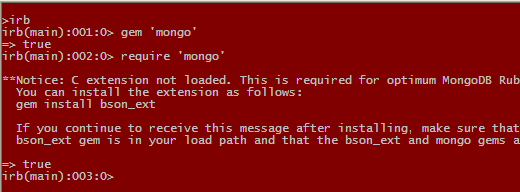
\n\t\t\t\t\tSince we’re just “playing”, we don’t need to worry about compiling the bson extension.<\/p>\nOk so now let’s open a connection on a new database we’ll call “test”<\/p>\n
\r\n\t\t\t\t\tm = Mongo::Connection.new.db('test')\r\n<\/pre>\n
\n\t\t\t\t\tAt this point Mongo has not yet created the physical database yet though so if you go to the \\data\\db folder no content has been created yet.\n\t\t\t\t\t<\/p>\nContent is typically organized in “collections”<\/b>, similarly to tables in the relational world,
\n\t\t\t\t\tbut with the important difference that a collection does not have schema and can store arbitrary objects of any shapes.
\n\t\t\t\t\tSo let’s create a collection of “widgets”<\/p>\n\r\n\t\t\t\t\tw = m.collection('widgets') \r\n\t\t\t\t\t\r\n\t\t\t\t\t# m.collection(...) can also be abbreviated as m[...]\r\n<\/pre>\n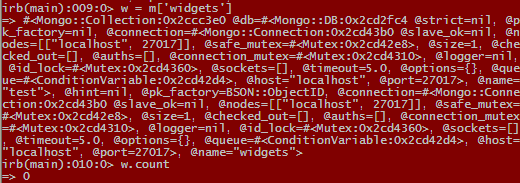
\n\t\t\t\t\tNow let’s add some widgets. We’ll start with a simple Ruby “hash”<\/b> object.\n\t\t\t\t\t<\/p>\n\r\n\t\t\t\t\tw1 = { :code => 'A101', \r\n\t\t\t\t\t\t\t\t:description => '1\/2 in. brass nut', \r\n\t\t\t\t\t\t\t\t:price => 0.15 }\r\n\t\t\t\t\tw << w1 \r\n<\/pre>\n
\n\t\t\t\t\tMongoDB returned the object id<\/b> of the hash we just stored in the widgets collection<\/b>.
\n\t\t\t\t\tNow we can see that data files were created in the \\data\\db<\/b> folder:
\n\t\t\t\t\t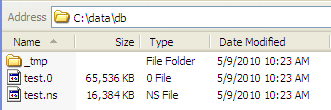 \n\t\t\t\t\t<\/p>\n
Ok now let's add one more widget so we can later do a query over more than one object!<\/p>\n
\r\n\t\t\t\t\tw2 = { :code => 'B201', \r\n\t\t\t\t\t\t\t\t:description => '1\/2 in. brass bolt', \r\n\t\t\t\t\t\t\t\t:price => 0.2 }\r\n\t\t\t\t\tw << w2\r\n<\/pre>\n
\n\t\t\t\t\tWe can now find and iterate over all objects in the collection using find<\/b> and each<\/b>:\n\t\t\t\t\t<\/p>\n\r\n\t w.find.each { |x| puts x.inspect }\r\n<\/pre>\n
\n\t\t\t\t\tWe can write more simple queries on a given attribute like:\n\t\t\t\t\t<\/p>\n\r\n\t w.find({ :code => 'A101' }).each { |x| puts x.inspect }\r\n<\/pre>\n
\n\t\t\t\t\tOr we can use a comparison operator like:\n\t\t\t\t\t<\/p>\n\r\n\t w.find({ :price => { '$gt' => 0.19 } })\r\n\t\t.each { |x| puts x.inspect }\r\n<\/pre>\n
\n\t\t\t\t\tOf course you can include multiple attributes in the criteria, limit the number of results, filter the list of attributes returned, etc.
\n\t\t\t\t\tCheck out the full description of the find<\/b> method here<\/a>
\n\t\t\t\t\tor review the full Ruby Mongo API<\/a>.\n\t\t\t\t\t<\/p>\nGoing Camping With MongoDB<\/h3>\n
Now that we have experimented with the basic features of MongoDB in IRB,
\n\t\t\t\t\twe can step up to a prototype web app using the Ruby Camping framework<\/a>. We will also incorporate the MongoMapper<\/a> data access layer.<\/p>\nA. Creating A Skeletal Camping App<\/h5>\n
I personally like using Camping<\/a> as it allows me to structure my app with the model-view-controller (MVC) pattern
\n\t\t\t\t\tall while keep all source in one file (I can always split it up later). The Camping server will also automatically reload the app
\n\t\t\t\t\tas I add features incrementally. Camping<\/a> is also lightweight and much simpler than Rails. So let's get started:<\/p>\n- \n
- Open up your favorite text editor (e.g. NotePad++ or TextMate) <\/li>\n
- Create a new Ruby file named mongo-camping-test.rb<\/b><\/li>\n
- Add the gem and require statements for camping and mongo\n\t\t\t\t\t\t<\/li>\n<\/ol>\n
\r\ngem 'camping' , '>= 2.0'\r\ngem 'mongo', '= 1.0' #Using 1.0 since MongoMapper explicitly needs 1.0\r\ngem 'mongo_mapper'\r\n\r\n%w(rack camping mongo mongo_mapper).each { | r | require r}\r\n<\/pre>\nOur app will be contained in a module named MongoTest<\/b>.
\n\t\t\t\t\t\t\tSo first, let's add the statement to tell Camping<\/a> to start our MongoTest module.
\n\t\t\t\t\t\t\tThe main MongoTest<\/b> module will have a create<\/b> method used to initialize the application so this is where we will place
\n\t\t\t\t\t\t\tthe logic to configure MongoMapper in terms of connection<\/b> and database<\/b>.\n\t\t\t\t\t\t\t<\/p>\n\r\nCamping.goes :MongoTest\r\n\r\nmodule MongoTest\r\n\tdef self.create\r\n\t\tMongoMapper.connection = Mongo::Connection.new\r\n\t\tMongoMapper.database = 'test'\r\n\tend\r\nend\t\r\n\r\nMongoTest.create\r\n<\/pre>\n
\n\t\t\t\t\t\t\tOur main MongoTest module will contain a submodule for each facet of our MVC pattern<\/b>: Models<\/b>, Controllers<\/b>, and Views<\/b>.
\n\t\t\t\t\t\t\tSo let's define these modules with the very basic minimum to allow a default route and view for the application:\n\t\t\t\t\t\t\t<\/p>\n\r\nmodule MongoTest\r\n\t# ...\r\n\t\r\n\tmodule Models\r\n\tend\r\n\t\r\n\tmodule Controllers\r\n\t\tclass Index\r\n\t\t\tdef get \r\n\t\t\t\trender :index\r\n\t\t\tend\r\n\t\tend\r\n\tend\r\n\t\r\n\tmodule Views\r\n\t\tdef index\r\n\t\t\th1 'My MongoDB App'\r\n\t\t\tdiv 'To be continued ...'\r\n\t\tend\r\n\tend\r\nend\r\n<\/pre>\n
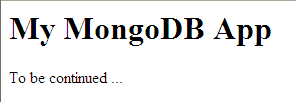
Now we have a skeletal Camping<\/a> app that we can run as follows:<\/p>\n
\r\ncamping mongo-camping-test.rb\r\n<\/pre>\n
Access the app from the browser at the following url:<\/p>\n
\r\nhttp:\/\/localhost:3001\/\r\n<\/pre>\n
 <\/p>\n
B. Creating The Model<\/h5>\n
In the skeleton we had created a Models module. This is where we will add our Widget class.
\n\t\t\t\t\tUnlike a traditional Camping<\/a> or Rails model, we will not have this class inherit from an ActiveRecord descendant class.
\n\t\t\t\t\tInstead we will just include<\/b> the <\/b>MongoMapper::Document<\/b> module.
\n\t\t\t\t\tThis module will turbo charge our model with all the needed Mongo features we need.<\/p>\n\r\n\tmodule Models\r\n\t\tclass Widget\r\n\t\t\tinclude MongoMapper::Document\r\n\t\tend\r\n\tend\r\n<\/pre>\n
Now we will define the attributes<\/b> of our Model: code<\/b>, description<\/b>, and price<\/b>.
\n\t\t\t\t\tNote that unlike in Camping<\/a> and Rails we don't need a migration!
\n\t\t\t\t\tMongoMapper also provides validators<\/b> like ActiveRecord, so we'll define a numeric validator and a custom validator
\n\t\t\t\t\tfor the price<\/b> attribute.
\n\t\t\t\t\tThe only \"gotcha\" we need to work-around is that if we don't override the collection name auto-generated for Widget, the table name will include the fully qualified model class name, containing the module hierarchy names! So we'll explicitly force the collection name.<\/p>\n\r\n\tmodule Models\r\n\t\tclass Widget\r\n\t\t\tinclude MongoMapper::Document\r\n\t\t\t\r\n\t\t\tkey :code, String\r\n\t\t\tkey :description, String\r\n\t\t\tkey :price, Float\r\n\t\t\t\r\n\t\t\tvalidates_numericality_of :price\r\n\t\t\tvalidates_true_for :price, \r\n\t\t\t\t:logic=> lambda { | x | x.price >= 0.05 && x.price <= 9999.99 }, \r\n\t\t\t\t:message=>\"must be in the following range: 0.05 to 9999.99\"\r\n\t\t\t\r\n\t\t\tset_collection_name 'widgets'\r\n\t\tend\r\n\tend\r\n<\/pre>\n<\/p>\nC. Creating The \"Home\/Index\" Controller<\/h5>\n
Now that we have a model, we can flesh-out our first controller.
\n\t\t\t\t\tOur initial skeleton has an Index<\/b> (i.e. home) controller and
\n\t\t\t\t\ta matching index<\/b> view rendered when an HTTP GET is
\n\t\t\t\t\treceived by Camping<\/a> on the default \"index\" route i.e. for the \/<\/b> path.
\n\t\t\t\t\tLet's modify the get<\/b> method of our Index<\/b> controller so we can retrieve the list of widgets using all<\/b> method on our Widget model<\/b>:<\/p>\n\r\n\t\tclass Index\r\n\t\t\tdef get\r\n\t\t\t\t@widgets = Widget.all\r\n\r\n\t\t\t\trender :index\r\n\t\t\tend\r\n\t\tend\r\n<\/pre>\n
D. Creating The \"Home\/Index\" View<\/h5>\n
By default, Camping uses a Ruby-syntax<\/b> based <\/b>templating engine<\/b> called Markaby<\/a>.
\n\t\t\t\t\tIt allows declaration of HTML elements using Ruby statements:<\/p>\n\r\n\th1 \"Welcome #{@your_name}\"\r\n<\/pre>\nNested HTML elements are represented by Ruby blocks:<\/p>\n
\r\n\ttable do\r\n\t\ttr { th 'First'; th 'Last'}\r\n\t\ttr { td 'John'; th 'Doe'}\r\n\tend\r\n<\/pre>\nFor more details on Markaby<\/a>, see here<\/a>.
\n\t\t\t\t\tNote: the upcoming 2.1 version of Camping uses Tilt<\/a> to let you choose your favorite templating engine (e.g. ERB, Haml<\/a>, ...).<\/p>\nSo, let's flesh-out our index<\/b> view method to render a table of widgets.\n\t\t\t\t\t<\/p>\n
\r\n\tmodule Views\r\n\t\tdef index\r\n\t\t\th1 \"Widgets\"\r\n\r\n\t\t\tif @widgets \r\n\t\t\t\ttable do\r\n\t\t\t\t\t\ttr { th 'id'; th 'Code'; th 'Description'; th 'Price'; }\r\n\t\t\t\t\t@widgets.each do | w |\r\n\t\t\t\t\t\ttr { \ttd w._id; \r\n\t\t\t\t\t\t\t\ttd w.code; \r\n\t\t\t\t\t\t\t\ttd w.description; \r\n\t\t\t\t\t\t\t\ttd w.price; }\r\n\t\t\t\t\tend\r\n\t\t\t\tend\r\n\t\t\telse\r\n\t\t\t\tp \"No widgets yets\"\r\n\t\t\tend\r\n\t\tend\r\n\tend\r\n<\/pre>\nLet's refresh our page (since Camping<\/a> will auto-reload our code on save in the editor):<\/p>\n
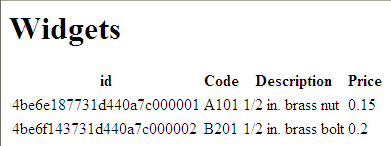 <\/p>\n
E. Add Widget Feature<\/h5>\n
Now let's add the ability to create and save new widgets.
\n\t\t\t\t\tWe'll start by creating a new AddWidget<\/b> controller in the Controllers<\/b> module
\n\t\t\t\t\tand register a new route for \/widget\/new<\/b>.
\n\t\t\t\t\tWe'll instance (not create) a new Widget<\/b> model and render it in a widget_form<\/b> (to be created soon):<\/p>\n\r\n\t\tclass AddWidget < R '\/widget\/new'\r\n\t\t\tdef get\r\n\t\t\t\t@widget = Widget.new(:code=>'', :description=>'', :price=>0)\r\n\t\t\t\trender :widget_form\r\n\t\t\tend\r\n\t\tend\r\n<\/pre>\n
Ok now we can create our widget_form<\/b> and allow a POST submit
\n\t\t\t\t\tto the route - using the R() Camping function - for our new AddWidget controller<\/b>.
\n\t\t\t\t\tNote: we will add an optional section at the top of the form to report any model validation errors:<\/p>\n\r\n\t\tdef widget_form\r\n\t\t\th2 \"New Widget\"\r\n\r\n\t\t\tif @errors\r\n\t\t\t\th3 \"Errors:\"\r\n\t\t\t\tol do\r\n\t\t\t\t\t@errors.each do | e |\r\n\t\t\t\t\t\tli { div \"#{e[0]}: #{e[1].join(' ')}\" }\r\n\t\t\t\t\tend\r\n\t\t\t\tend\r\n\t\t\tend\r\n\t\t\t\r\n\t\t\tform :action => R(AddWidget), :method => 'post' do\r\n\t\t\t label 'Code:', :for => 'widget_code'; br\r\n\t\t\t input :name => 'widget_code', :type => 'text', :value => @widget.code; br\r\n\r\n\t\t\t label 'Description:', :for => 'widget_description'; br\r\n\t\t\t input :name => 'widget_description', :type => 'text', :value => @widget.description; br\r\n\r\n\t\t\t label 'Price:', :for => 'widget_price'; br\r\n\t\t\t input :name => 'widget_price', :type => 'text', :value => @widget.price.to_s; br\r\n\t\t\t \r\n\t\t\t input :type => 'submit', :value => 'Save'\r\n\t\t\tend\r\n\t\tend\r\n<\/pre>\nAccess the new widget form from the browser at the following url:<\/p>\n
\r\nhttp:\/\/localhost:3001\/widget\/new\r\n<\/pre>\n
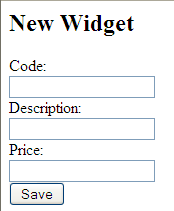 <\/p>\n
Now we can add the handler for the HTTP POST to our AddWidget controller<\/b>.
\n\t\t\t\t\tAfter validating the user entered some actual data, we'll create (not instantiate)
\n\t\t\t\t\ta new Widget model instance<\/b> with the user's data and call the save<\/b> method
\n\t\t\t\t\tto add it to the widgets collection<\/b>.
\n\t\t\t\t\tWe'll redirect back to the form if the model did not pass validation rules or if the save failed.
\n\t\t\t\t\tThen we'll re-query the list of widgets and render the index view<\/b> to show the new data.<\/p>\n\r\n\t\tclass AddWidget < R '\/widget\/new'\r\n\t\t\t# ...\r\n\t\t\t\r\n\t\t\tdef post\r\n\t\t\t\treturn(redirect('\/index')) unless input.widget_code && input.widget_description && input.widget_price\r\n\t\t\t\t\r\n\t\t\t\tw = Widget.create(:code => input.widget_code,\r\n\t\t\t\t\t\t\t\t\t\t\t\t:description => input.widget_description,\r\n\t\t\t\t\t\t\t\t\t\t\t\t:price => input.widget_price.to_f)\r\n\t\t\t\t\r\n\t\t\t\tbegin\r\n\t\t\t\t\tw.save!\r\n\t\t\t\t\t@widgets = Widget.all\r\n\t\t\t\t\treturn(render(:index))\r\n\t\t\t\trescue Exception => ex\r\n\t\t\t\t\t@errors = w.errors\r\n\t\t\t\t\treturn(render(:widget_form))\r\n\t\t\t\tend\r\n\t\t\tend\r\n\t\tend\r\n<\/pre>\nF. Search Widget Feature<\/h5>\n
Finally let's add the ability to search for a specific widget based on a widget code.
\n\t\t\t\t\tWe'll start by creating a new SearchWidgetByCode<\/b> controller in the Controllers<\/b> module
\n\t\t\t\t\tand register a new route for \/widget\/search<\/b>.<\/p>\n\r\n\t\tclass SearchWidgetByCode < R '\/widget\/search'\r\n\t\t\tdef get\r\n\t\t\t\trender :search_form\r\n\t\t\tend\r\n\t\tend\r\n<\/pre>\n
Ok now we can create our search_form<\/b> and allow a POST submit
\n\t\t\t\t\tto the route - using the R() Camping function - for our new SearchWidgetByCode controller<\/b>:<\/p>\n\r\n\t\tdef search_form\r\n\t\t\th2 \"Search\"\r\n\t\t\tp @info if @info\r\n\t\t\t\r\n\t\t\tform :action => R(SearchWidgetByCode), :method => 'post' do\r\n\t\t\t label 'Code', :for => 'widget_code'; br\r\n\t\t\t input :name => 'widget_code', :type => 'text'; br\r\n\t\t\t input :type => 'submit', :value => 'Search'\r\n\t\t\tend\r\n\t\tend\r\n<\/pre>\n
Access the widget search form from the browser at the following url:<\/p>\n
\r\nhttp:\/\/localhost:3001\/widget\/search\r\n<\/pre>\n
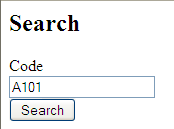 <\/p>\n
Now we can add the handler for the HTTP POST to our SearchWidgetByCode<\/b>.
\n\t\t\t\t\tWe'll use the traditional dynamic finder method like in ActiveRecord: find_by_code<\/b> method and pass a criteria based on the code<\/b> attribute
\n\t\t\t\t\tThe results will be rendered using the index view<\/b>.<\/p>\n\r\n\t\tclass SearchWidgetByCode < R '\/widget\/search'\r\n\t\t\t# ...\r\n\t\t\t\r\n\t\t\tdef post\r\n\t\t\t\treturn(redirect('\/index')) unless input.widget_code\r\n\t\t\t\t\r\n\t\t\t\tw = Widget.find_by_code input.widget_code\r\n\t\t\t\t@widgets = [ ] \r\n\t\t\t\t@widgets << w if w\r\n\t\t\t\t\r\n\t\t\t\trender :index\r\n\t\t\tend\r\n\t\tend\r\n<\/pre>\n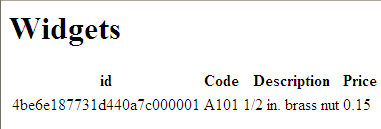 <\/p>\n
G. Exercises Left For The Reader<\/h5>\n
Now that we have scratched the surface of the possibilities offered by MongoDB and MongoMapper,
\n\t\t\t\t\twe could extend our prototype to include the following features:\n\t\t\t\t\t<\/p>\n- \n
- Add indexes to the database<\/li>\n
- Limit the main view to include only the first 12 items, and add paging<\/li>\n
- Add model validation rules to Widget model<\/li>\n
- Add more attributes to the Search criteria<\/li>\n
- Add an Edit page to leverage the save(object)<\/b> feature of a collection<\/li>\n
- Add embedded models\/document to Widget (e.g. TechnicalSpecification, etc.)<\/li>\n<\/ol>\n
You can now leverage the power of Camping<\/a>, Markaby and REPL to add these features on your own. :-).
\n\t\t\t\t\tNote: you can mix and match templating engine in Camping 2.1 using Tilt<\/a> - which allows you to use ERB, Haml<\/a>, etc.<\/p>\nSo What? <\/h3>\n
- \n
- The combination of MongoDB and MongoMapper makes it very easy to implement SQL-less persistence<\/b><\/li>\n
- We could work in a schema-less mode<\/b> while using using hashes<\/b> and the base Mongo Ruby Driver<\/li>\n
- But we can adopt migration-less models<\/b> and have more structure<\/li>\n
- MongoMapper draws a lot of features from ActiveRecord making the transition easy<\/li>\n
- Since Camping is lightweight yet powerful, writing solid MongoDB apps can be done easily<\/li>\n<\/ol>\n
So hopefully this post will have given you a feel for what development with MongoDB\/Ruby and Camping feels like.
\n\t\t\t\t\tHappy experimentations!!!<\/p>\n\t\t\t\t\t<\/a><\/p>\n
References and Resources<\/h3>\n
- \n
- Cloud storage in a post-SQL world<\/a><\/li>\n
- Cassandra - \"Dude where is my database?\" Techzing Live podcast<\/a><\/li>\n
- CouchDB - Stack Overflow podcast<\/a><\/li>\n
- MongoDB - Mike Dirolf's Interview on Techzing Live podcast<\/a><\/li>\n
- MongoDB - official site<\/a><\/li>\n
- MongoDB - Mike Dirolf's Intro Slides<\/a><\/li>\n
- MongoHQ<\/a><\/li>\n
- MongoDB Ruby API<\/a><\/li>\n
- MongoMapper Overview Presentation by John Nunemaker<\/a><\/li>\n
- Mongo Mapper - Data Access Layer<\/a><\/li>\n
- Ruby Camping Framework<\/a><\/li>\n
- Markaby - Ruby Templating Engine<\/a><\/li>\n
- Markaby Cheat Sheet<\/a><\/li>\n
- Tilt - Templating Engine Adapter<\/a><\/li>\n
- Haml - Ruby Templating Engine<\/a><\/li>\n
- Heroku Cloud Hosting for Ruby<\/a><\/li>\n
- NoSQL catalog of products<\/a><\/li>\n<\/ul>\n
My Other Related Posts:<\/h5>\n
- Cassandra - \"Dude where is my database?\" Techzing Live podcast<\/a><\/li>\n
- We could work in a schema-less mode<\/b> while using using hashes<\/b> and the base Mongo Ruby Driver<\/li>\n
- Add embedded models\/document to Widget (e.g. TechnicalSpecification, etc.)<\/li>\n<\/ol>\n
- Add the gem and require statements for camping and mongo\n\t\t\t\t\t\t<\/li>\n<\/ol>\n
- After installing it, I had to create the data folder under \\data\\db<\/b>. Note that this is important since the folder does not get created automatically.<\/li>\n
- I downloaded the latest version from http:\/\/www.mongodb.org\/display\/DOCS\/Downloads<\/a>.